Auxiliary Points of Distance Dimension
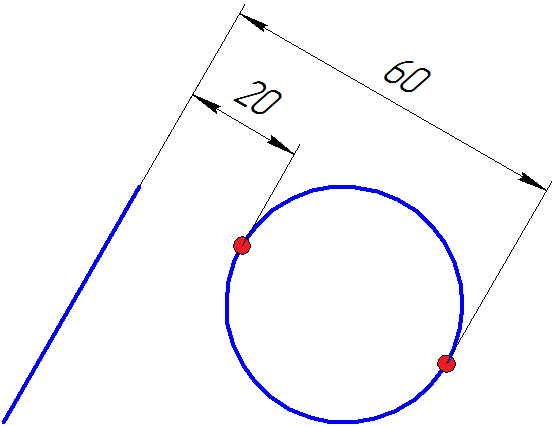
You can’t uniquely define distance dimensions and also diameter dimensions for some object types without additional indication of the points used to measure the dimension. For example, a distance between a circle and a line segment can be measured using two methods: from the “farthest” circle point to the segment or from the “closest” point to the segment. See Fig.1 The terms “farthest” and “closest” are quoted because the situation can become different when the dimension is changed: then the “farthest” point will become closer to the segment than the “closest” point.
 {width=”50%”}
Fig. 1
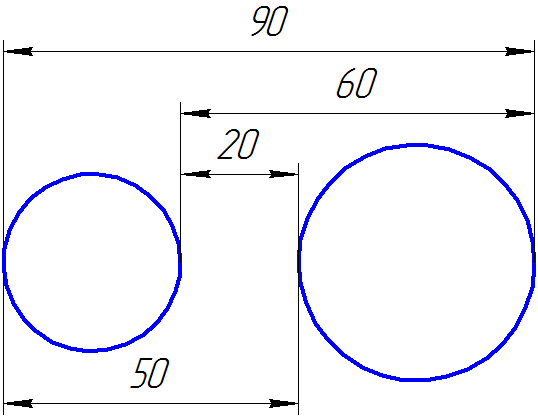
To uniquely define the dimensions, you should call the GCE_AddPoint() method to create an auxiliary point, in which the dimension extension line from the circle side will start. The descriptor of this point will be used as an auxiliary point when the distance dimension would be created. In the example shown in Fig. 28.1.1, only one point on the circle side is required. In other cases, such as distance from circle to circle, two auxiliary points are needed, because there are four possible dimension measurement variants for a pair of circles. See Fig.2 Dimensions equal to 30, 50, 60 and 90 show variants of measuring distances between two circles, and, correspondingly, variants of selecting auxiliary point pairs on the circles.
 {width=”50%”}
Fig. 2