Constructing a Body with Edge Chamfers
The function
MbResultType ChamferSolid(       MbSolid &                    solid,
                                 MbeCopyMode                  sameShell,
                           const MbShellChamferParams &       chamferParams,
                                 c3d::SolidSPtr &             result );
constructs chamfers on the specified edges of the source body.
The input parameters of the function are:
solid is the source body;
sameShell is the mode of copying the source body;
chamferParams are the construction parameters.
The output parameter of the function is the constructed body result.
The function returns the operation result code from the MbResultType enumeration.
The function is declared in the action_solid.h file.
When constructing bodies with edge chamfers, to initialize the chamferParams objects with the operation parameters, the following constructor is defined in the MbShellChamferParams class:
MbShellChamferParams( const c3d::EdgesSPtrVector &  initCurves,
                      const SmoothValues &          params,
                      const MbSNameMaker &          names )
: _initCurves( initCurves )
, _nameMaker( &names.Duplicate() )
, _params( params ){}
where
initCurves is an array of body edges to be processed;
params is an object with the chamfer construction parameters;
names is a name maker.
The solid parameter contains the source body whose edges are to be processed.
The sameShell parameter controls the transfer of faces, edges and vertices from the source body solid to the resulting body result and can take one of four values:
cm_Same = 0 (the shell is not copied);
cm_KeepHistory (the source shell and its copy have common base surfaces, vertices and faces not modified by the operation);
cm_KeepSurface (the source shell and its copy have common base surfaces);
cm_Copy (the source shell and its copy have no common data).
The MbeCopyMode enumeration is described in detail in the section Copying a Set of Faces MbFaceShell.
To construct edge chamfers, the same SmoothValues & params parameters are used as for edge filleting. The SmoothValues class is described in the op_shell_parameter.h file. The params object contains information about the shape and the method of mating adjacent faces of the processed edges. For chamfer construction, the following data of the params parameter are used*:
distance1 is the first leg of the chamfer;
distance2 is the second leg of the chamfer;
begLength is the distance from the start vertex to the mating stop point (a negative value means no stop; the value must be equal to UNDEFINED_DBL if no stop is required);
endLength is the distance from the end vertex to the mating stop point (a negative value means no stop; the value must be equal to UNDEFINED_DBL if no stop is required);
form is the mating type from the MbeSmoothForm enumeration;
smoothCorner is the method of rounding suitcase corners;
prolong is a flag of extension of the chamfer along tangent edges;
vector1 is the normal vector of the mating stop plane at the start;
vector2 is the normal vector of the mating stop plane at the end.
* All public fields will be moved to the private section. To specify chamfer parameters, specialized initialization methods should be used:
// initialization of a chamfer with equal offsets
bool InitChamfer( double dist );

// initialization of a chamfer with different offsets
bool InitChamfer( double dist1, double dist2 );

// initialization of a chamfer by one leg and an angle
bool InitOneSideChamfer( bool firstSide, double dist, double ang );
Additional properties of the operation are specified by the SetProperties() method, whose arguments are:
c is a shape coefficient, varying from 0.05 to 0.95 (at 0 — a circular arc);
pro is a flag of extension along the tangent;
cor is the method of rounding suitcase corners;
autoS is automatic detection of edge/surface preservation;
keep specifies whether to preserve the edge (true) or to preserve the fillet/chamfer surface (false);
str is strict filleting. If false, fillet at least what is possible;
equ specifies inserting a toroidal surface at mating corners.
To specify stops, the SetBegLength ()/SetEndLength() methods are defined (by default, no stop is specified).
The chamfer mating method is controlled by the form parameter. For edge chamfer construction, the values of the form parameter equal to st_Chamfer, st_Slant1 and st_Slant2 are used.
If form = st_Chamfer, the function constructs a chamfer surface with the specified legs defined by the distance1 and distance2 parameters, see Fig. 1:
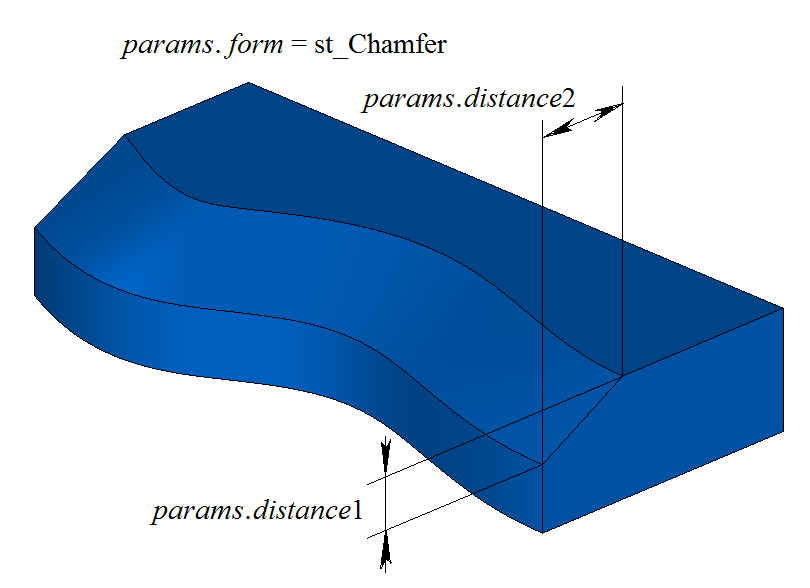
Fig. 1
If form = st_Slant1, the function constructs a chamfer surface with the specified leg distance1 and the adjacent angle determined by the distance2 leg, see Fig. 2:
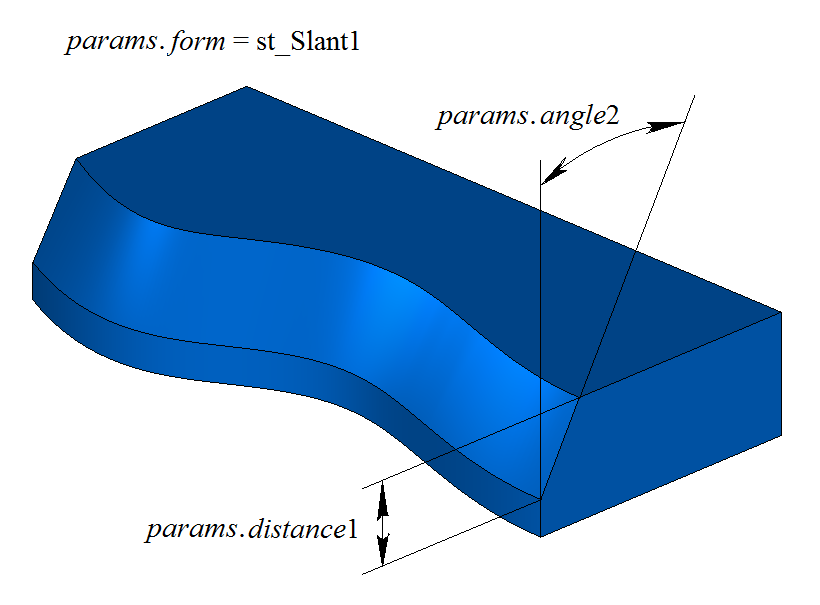
Fig. 2
If form = st_Slant2, the function constructs a chamfer surface with the specified angle and the adjacent leg. The distance1 parameter corresponds to the leg that ensures the specified angle, and distance2 defines the adjacent leg, see Fig. 3:
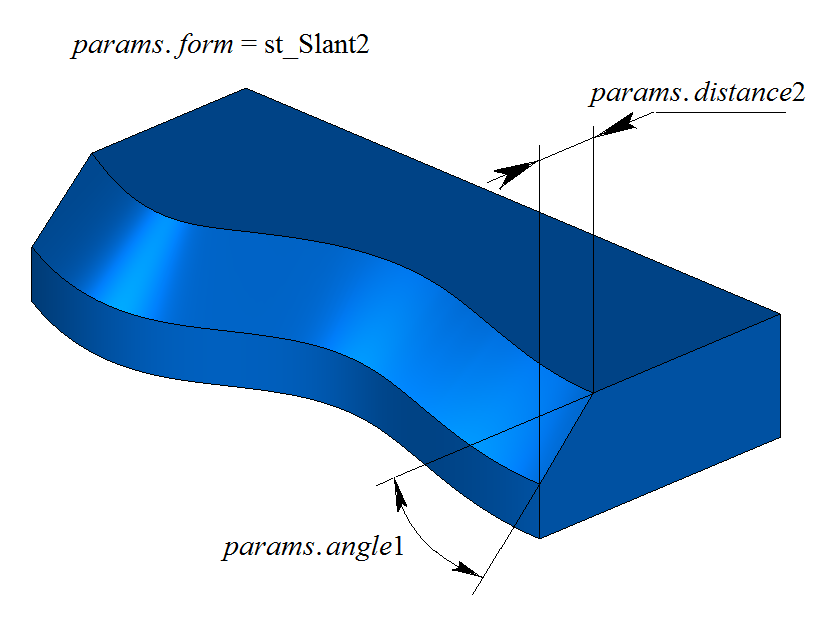
Fig. 3
Fig. 4 shows an example of stopping the chamfer at the distance begLength from the start vertex and at the distance endLength from the end vertex of the processed edge. If mating stopping is not required, then the begLength and endLength distances must take negative values.
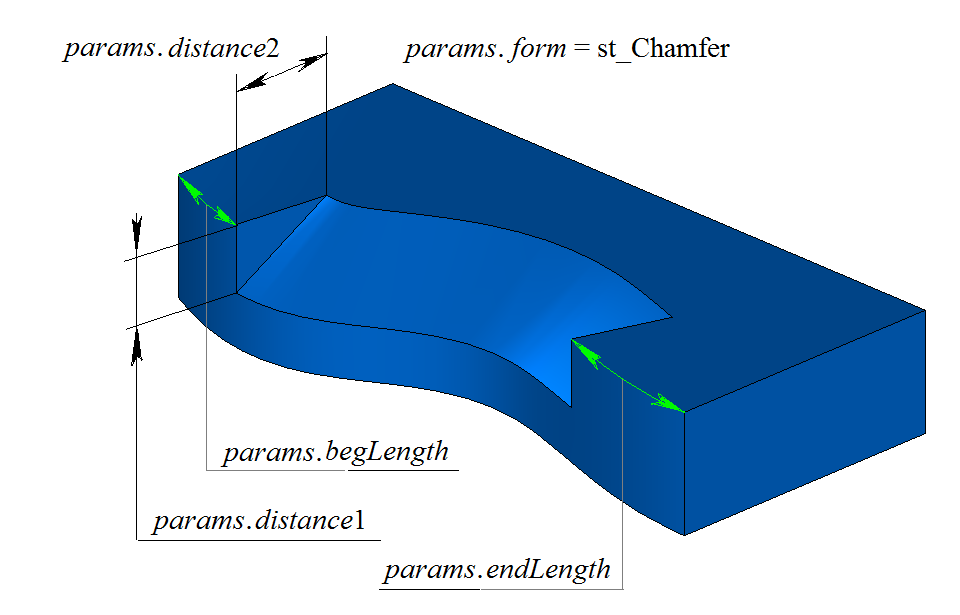
Fig. 4
Using the body example shown in Fig. 5, we demonstrate how the prolong flag works when constructing a chamfer on the selected edge:
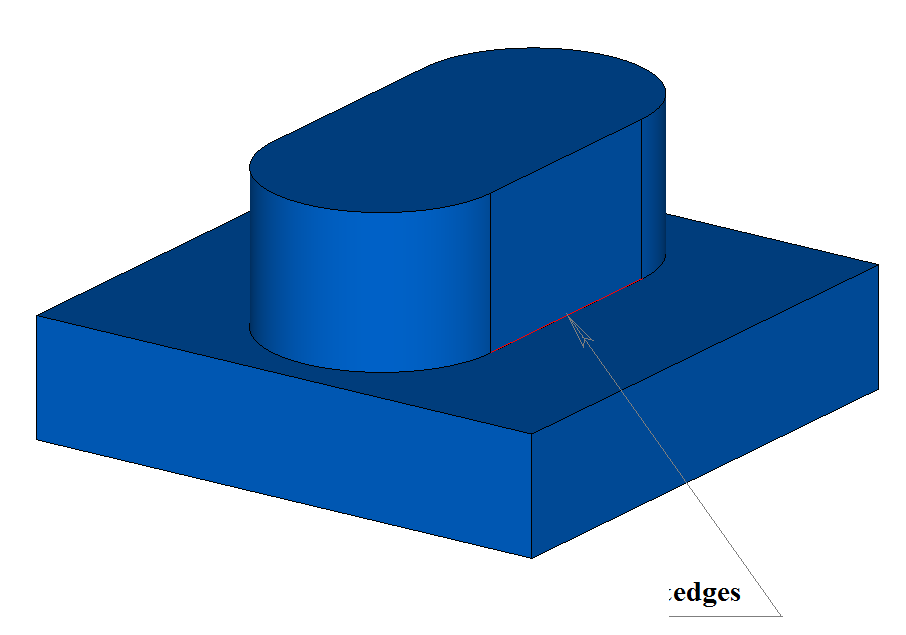
Fig. 5
The prolong flag specifies which edges of the body must be processed. If prolong = false, only those edges that are specified in the initCurves container are processed, see Fig. 6:
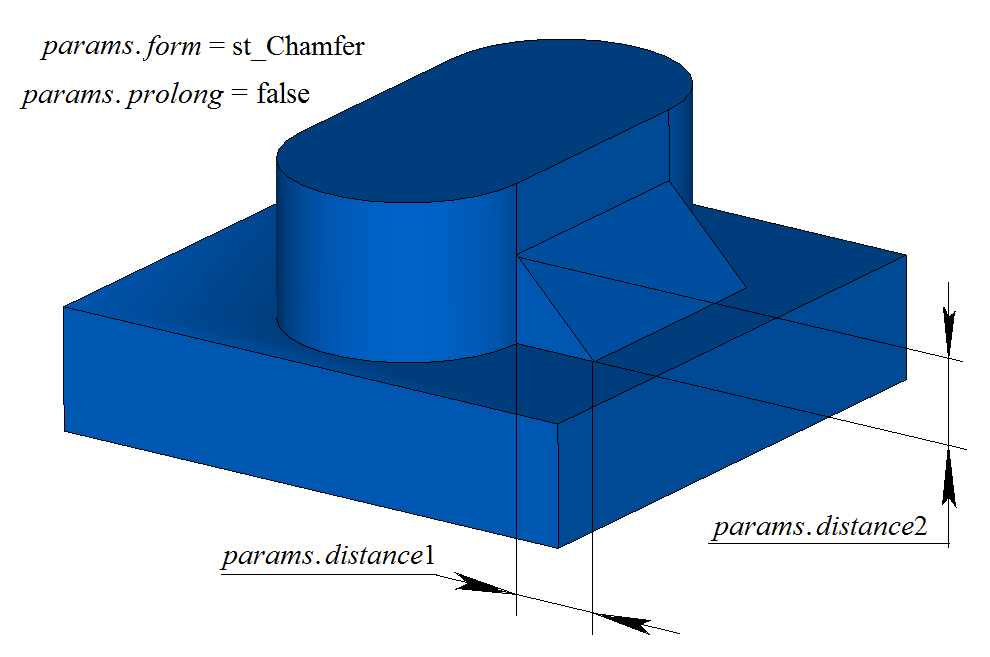
Fig. 6
If prolong = true, the edges specified in the initCurves container as well as edges smoothly joined with them are processed, see Fig. 7:
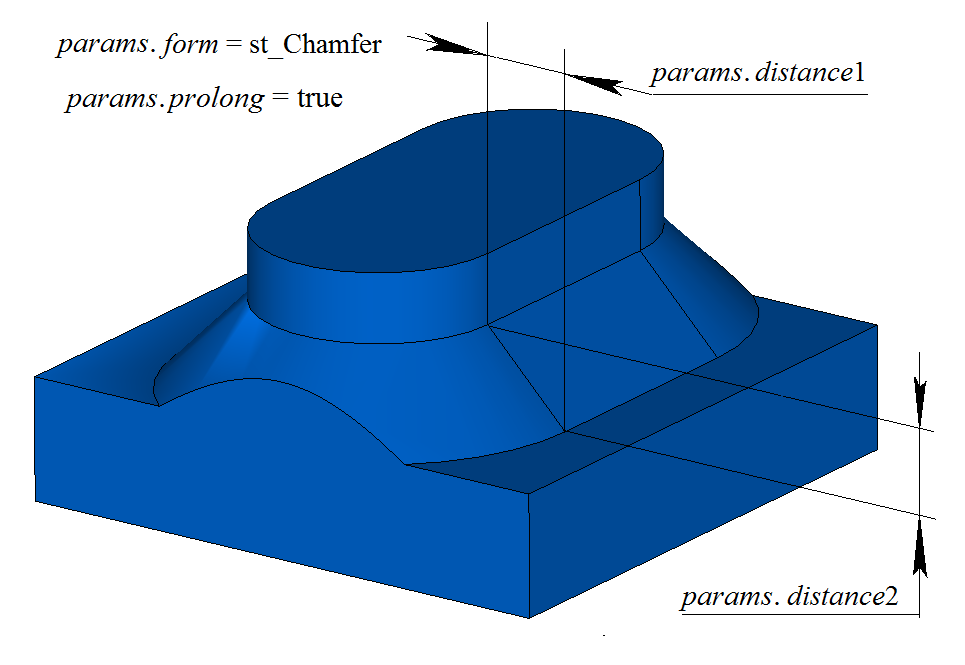
Fig. 7
When a chamfer is constructed on three edges meeting at one vertex, the smoothCorner parameter defines the method of processing suitcase corners. Using the body example shown in Fig. 8, we demonstrate the effect of the smoothCorner parameter when constructing chamfers on all edges of the body.
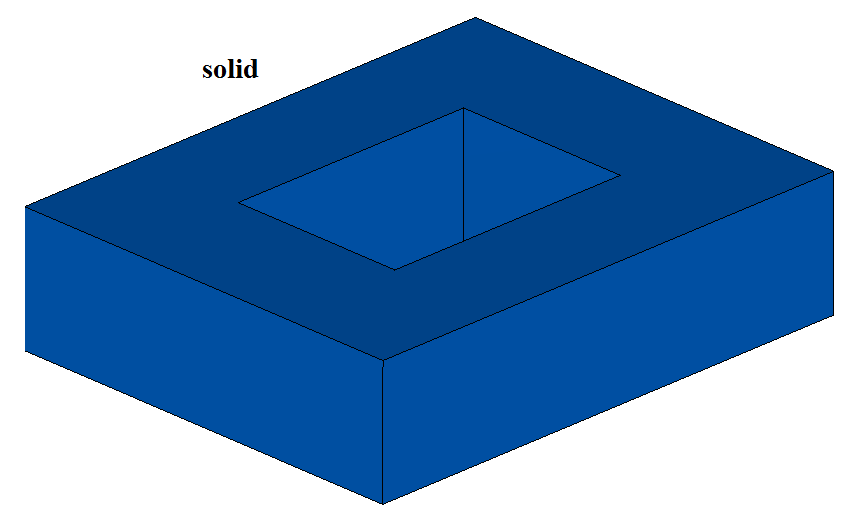
Fig. 8
If smoothCorner = ec_pointed, then corners where three edges of the same convexity meet are not processed, and the resulting body contains a point where three chamfer faces meet, see Fig. 9:
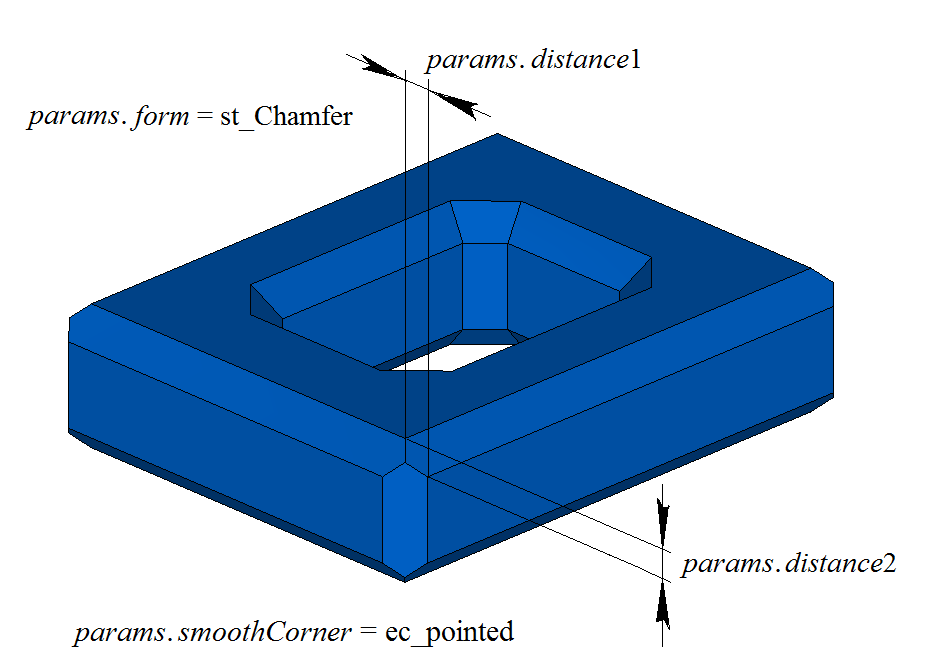
Fig. 9
For all other values of the smoothCorner parameter, corners where three edges of the same convexity meet are processed by constructing an additional face, as shown in Fig. 10:
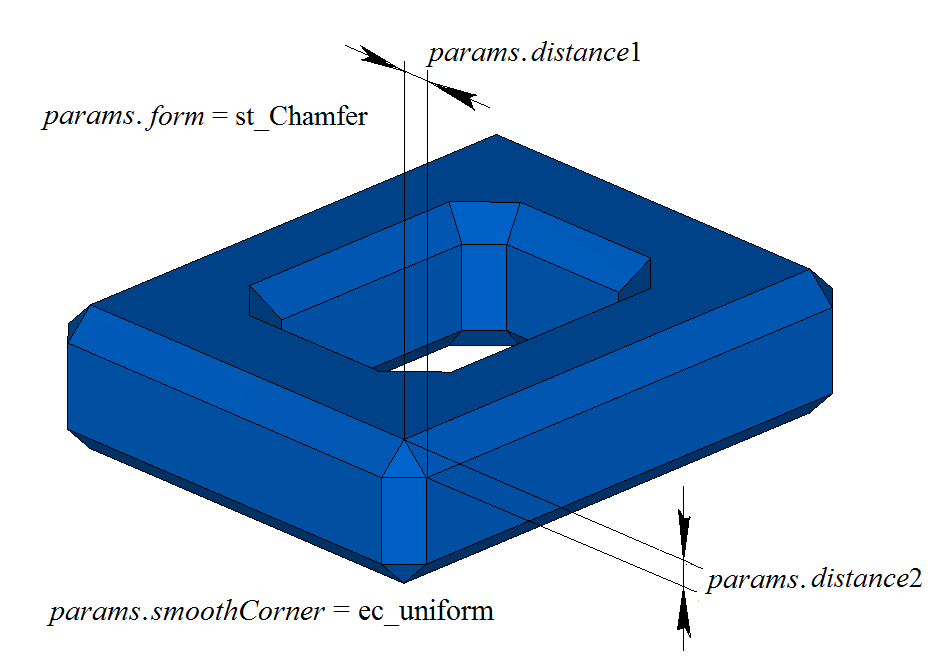
Fig. 10
Using the pyramid-shaped body example shown in Fig. 11, we demonstrate the behavior of the considered function when constructing a chamfer in special cases. The result of construction for a symmetric edge configuration and a symmetric chamfer is shown in Fig. 12:
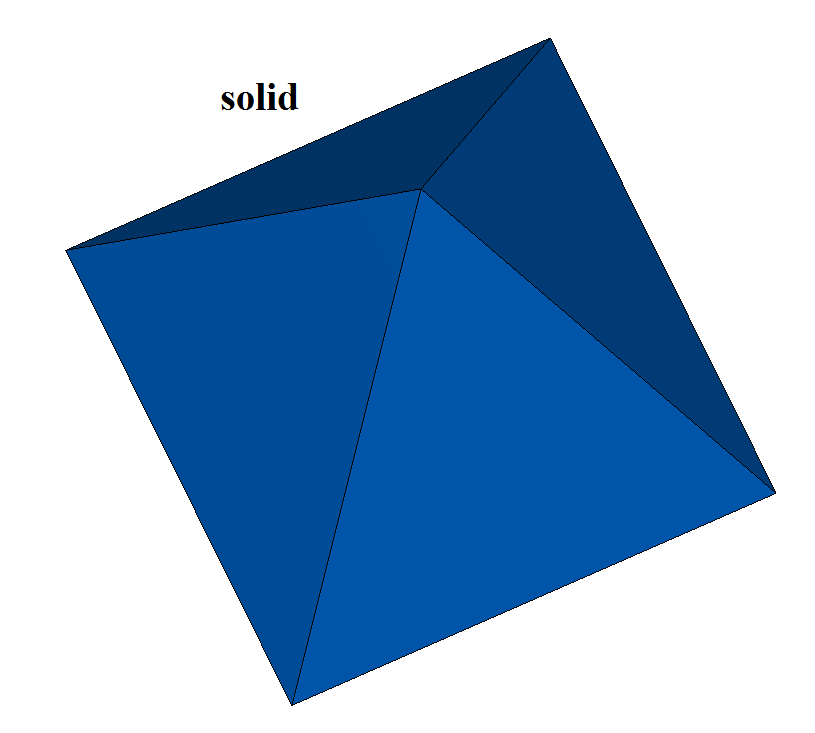
Fig. 11
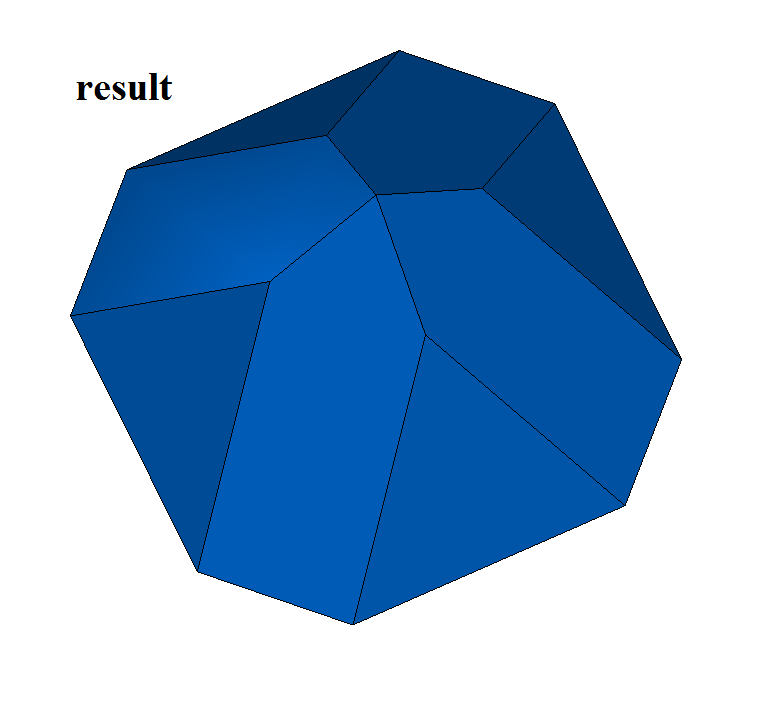
Fig. 12
It should be noted that to construct a chamfer on four or more edges meeting at one vertex, the intersection of all chamfer surfaces at one point is required. An example of a symmetric chamfer on seven edges meeting at a common vertex is shown in Fig. 13:
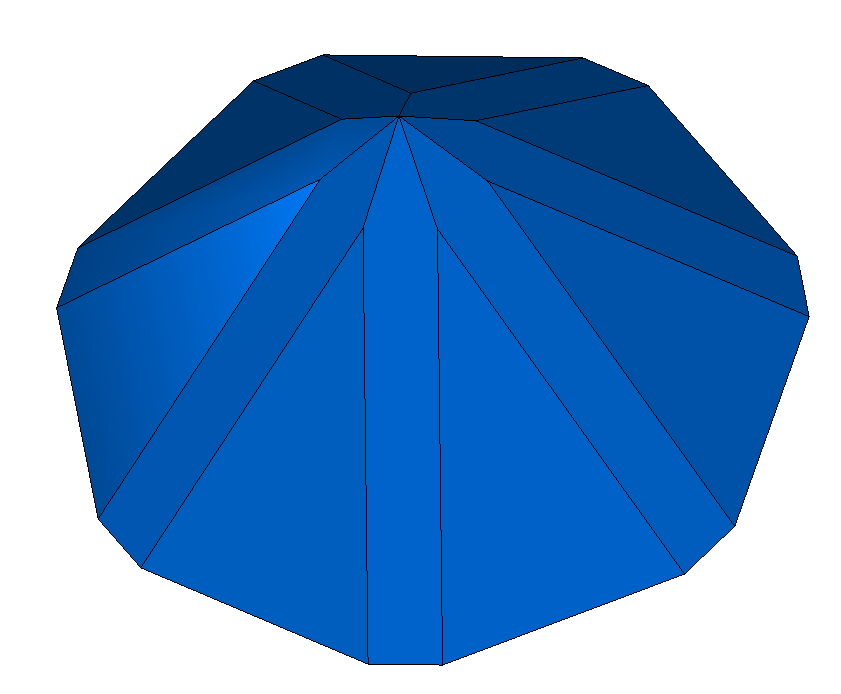
Fig. 13
When the distance1 and distance2 parameters in the chamfer construction function are not equal and several edges are specified for processing, it is difficult to understand which parameter corresponds to what. In this situation it is recommended to use the auxiliary functions SmoothPhantom(), SmoothSequence() and SmoothPositionData(), which are declared in the action_phantom.h file.
The SmoothPhantom() function constructs simplified surfaces to simulate the future chamfers.
The SmoothSequence() function constructs sequences of edges to which, if desired, smoothly joined edges to be processed together can be added.
The SmoothPositionData() function computes three points for the processed edges, which are used for phantom dimensions of legs and angles. Usually these functions are used to draw a phantom that makes it possible to understand what will be obtained as a result of the operation and to change the parameters if necessary.
Before constructing chamfers, the processed edges are sorted; if necessary or on demand, smoothly joined edges are added to them, and sequences of smoothly joined edges are created from the edges. The distance1 and distance2 parameters are associated with the first and second surfaces respectively of the intersection curve of the first edge in the sequence of smoothly joined edges.
The surfaces can be obtained by the intersection-curve methods GetCurveOneSurface() and GetCurveTwoSurface().
By the distance1 and distance2 values of the first edge, the parameters for the remaining edges of each sequence are determined.
When constructing edge chamfers, the considered function adds the MbChamferSolid builder to the history of the constructed body; this builder is declared in the cr_chamfer_solid.h file.
In the test application test.exe, body construction with chamfers is performed by the menu commands:
“Create → Body → By edges processing → Cathetus-cathetus chamfer”;
“Create → Body → By edges processing → Cathetus-angle chamfer”;
“Create → Body → By edges processing → Angle-cathetus chamfer”.