Embedding the GCM component into an application
The GCM geometric solver is created as a multi-purpose 3D parametric modeling component. Therefore, it can be embedded into any application where the functionality of dimensions and constraints should be added to a 3D geometric model. The key feature is that integration with the C3D Solver does not require any modifications in data structures of the application.
The software interface of the C3D Solver has its own abstract system of data types which is not related to data types of the C3D Modeler module. Therefore, the application may either use or not use data C3D Modeler data structures when working with the solver. Connecting the geometric solver to manage a geometric model requires that the application interacts with the solver as follows:
Create a geometric constraint system. This is the first thing to be done to begin using C3D Solver.
Add objects to the constraint system. Add geometric objects to the system using GCM_AddGeom, GCM_SubGeom calls (see Adding and deleting geometric objects). Descriptors (see Table 32.6.1. Descriptor data types) that provide these functions are used for storing the links of the application objects to C3D Solver’s geometric objects. For optimal memory use, we do not recommend adding objects unless they are connected by constraints.
Add geometric constraints to the system. Add constraints using the calls mentioned in Adding and deleting geometric objects. Application constraints refer to C3D Solver constraints using special descriptors (see Descriptor data types).
Solve the system of constraints. C3D Solver uses the GCM_Evaluate call to calculate a new state of geometric objects that satisfy the previously declared constraints.
Apply the calculation results. Apply the calculated coordinates of objects from the C3D Solver constraint system to geometric objects of the application. The calculated result is stored in the C3D Solver. So, the application should update the state of its objects by requesting new coordinate values from the solver.
Deleting objects and constraints. Once you have finished a constraint system session, the application calls the GCM_RemoveSystem method. Also, during the life cycle of the constraint system, you can individually delete constraints and objects when you no longer need them (see Adding and deleting geometric objects)
To adapt the geometric solver to native data types of the application, organize an interface between the application and the GCM component. You can see a sample diagram of interaction between the constraint solver and the application in Figure 1. The diagram suggests creating a special Constraint Manager to solve the following tasks:
“Hides” the API C3D Solver behind it and provides an interface which is more convenient and expressed in the native data of the application;
Loads data on 3D model objects and constraints to the solver (geometric problem definition);
Processes command queries such as adding/deleting data of the constraint system, and calculation requests;
Ensures feedback from the solver, applies the results of C3D Solver calculations to the geometric model of the application;
Updates the solver data for synchronization with the application model.
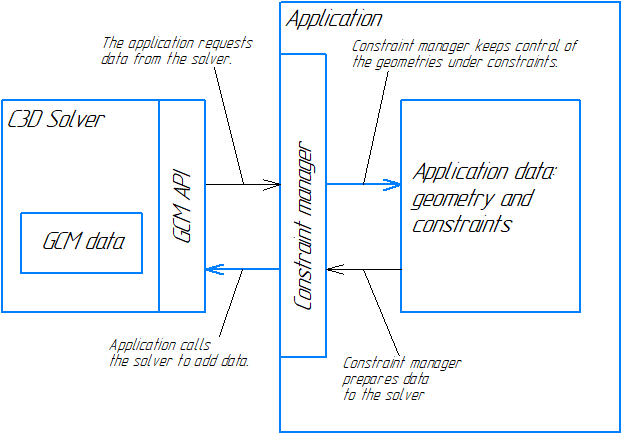
Fig. 1
The diagram shown in Fig. 1 is not mandatory. It simply demonstrates one of the options to integrate C3D Solver with the application.
The GCM component does not permit saving user data in a document file, so an application developer should take care of read/write permissions for the 3D model constraint system in the application document.