Wireframe Extension
The function
MbResultType ExtendWireFrame(       c3d::WireFrameSPtr &           wireframe,
                                    MbeCopyMode                    sameEdges,
                              const MbCurveExtensionParameters3D & params,
                                    c3d::WireFrameSPtr &           result );
extends the given wireframe, thereby generalizing the curve extension operation.
The function parameters are:
wireframe - the source (extendable) wireframe (it is recommended to pass a normalized wireframe);
sameEdges - the copy mode of the input wireframe;
params - the extension parameters;
result - the resulting wireframe.
The function is declared in the action_wireframe.h file.
The MbCurveExtensionParameters3D class inherits the properties of the MbCurveExtensionParameters class. The params object defines the following group of wireframe extension parameters:
start extension parameters - an object of the MbCurveExtensionEnds class or one of its derived classes (MbCurveExtensionLinear, MbCurveExtensionCircular, MbCurveExtensionNatural);
end extension parameters - an object of the MbCurveExtensionEnds class or its derived classes, which is set independently of the start parameters;
the closure permission flag (allowClosure), which determines whether the curve is allowed closing during extension. In the course of extension (if the extension length is sufficiently large), the curve may become closed. This is not always desirable, since a gap may need to be preserved between the endpoints. To prevent closure, set allowClosure = false. The gap value is determined by internal algorithms and is not available for modification by the user. If the extended curve has reached its maximum length (either the curve became closed, or the maximum permissible gap between the endpoints has been achieved), one of the following warnings is issued: rt_CurveClosedAtStart, rt_CurveClosedAtEnd, or rt_CurveClosedBothSides (see Table).
the along-surface extension flag (alongSurface), which determines whether the surface curve (MbSurfaceCurve) must remain on its surface. The difference is illustrated in Fig. 1, which shows a surface of revolution with an arbitrary surface curve on it (blue) and two variants of arc extension:
if the curve is extended as a spatial curve (alongSurface = false), the extended segment (purple) is a circular arc, but may leave the surface;
when extending along the surface (alongSurface = true), the curve always remains on the surface, but the shape of the extension segment (orange) depends on the surface geometry. For non-surface curves when alongSurface = true, the error code rt_IncorrectData is returned.
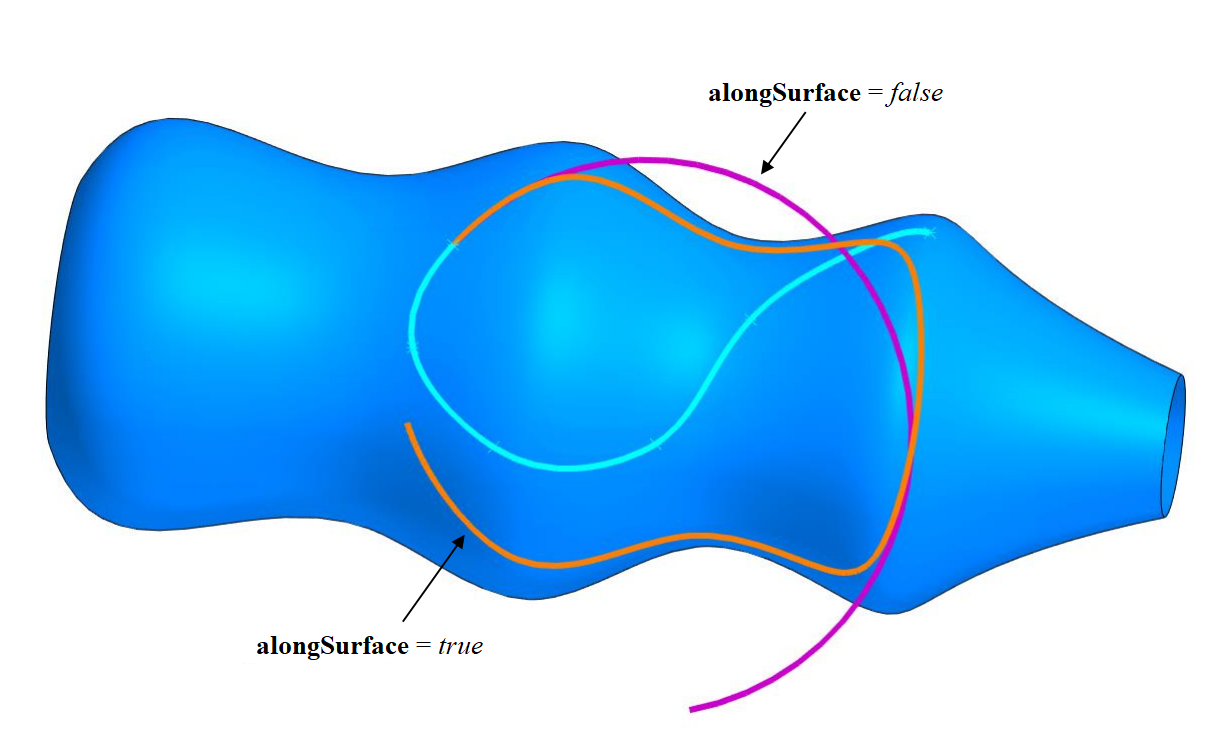
Fig. 1
the operation name maker (an object of the MbSNameMaker class), used for naming the created wireframe.
In most cases, when extending along a surface, it is not allowed the extended curve to go beyond the boundaries. If it occurs, the operation returns the error rt_BeyondLimitsExtension (see Table). Going beyond the boundaries is permitted for MbElementarySurface and for periodic surfaces on the boundaries that correspond to the periodic direction.
The MbCurveExtensionEnds class describes the extension parameters for an individual endpoint of the wireframe. The following terms are used in the documentation:
extension length — the metric length by which the wireframe is extended from the selected endpoint;
extension method — a value of the MbeCurveExtensionWays enumeration that defines the extension method (linear, circular arc, or natural continuation of the original wireframe).
Three different extension methods are implemented in the geometric kernel:
The linear extension method (MbeCurveExtensionWays::cew_Linear) is performed by restoring the tangent at the given point of the curve and laying off a segment of the specified length along it. This method ensures smoothness of at least G1 at the junction with the extension segment. The parameters for this extension method are set via objects of the MbCurveExtensionLinear class.
The circular arc extension method (MbeCurveExtensionWays::cew_Circular) is performed by constructing the osculating circle at the endpoint being extended and taking its arc of the specified length. This method ensures smoothness of at least G2. The parameters for this extension method are set via objects of the MbCurveExtensionCircular class.
The natural continuation extension method (MbeCurveExtensionWays::cew_CommonNatural) extends the curve as a natural continuation of the original curve (the shape it had immediately before the extension operation). The result is the same curve, only with a greater length. However, in some cases extension is performed by creating a contour and attaching to the original curve a NURBS segment that ensures continuity of at least G3 at the junction joint. The parameters for this extension method are set via objects of the MbCurveExtensionNatural class.
The MbCurveExtensionLinear, MbCurveExtensionCircular, and MbCurveExtensionNatural classes are derived from MbCurveExtensionEnds and allow setting the extension parameters specific to each particular method. The differences between the extension methods are illustrated in Fig. 2:
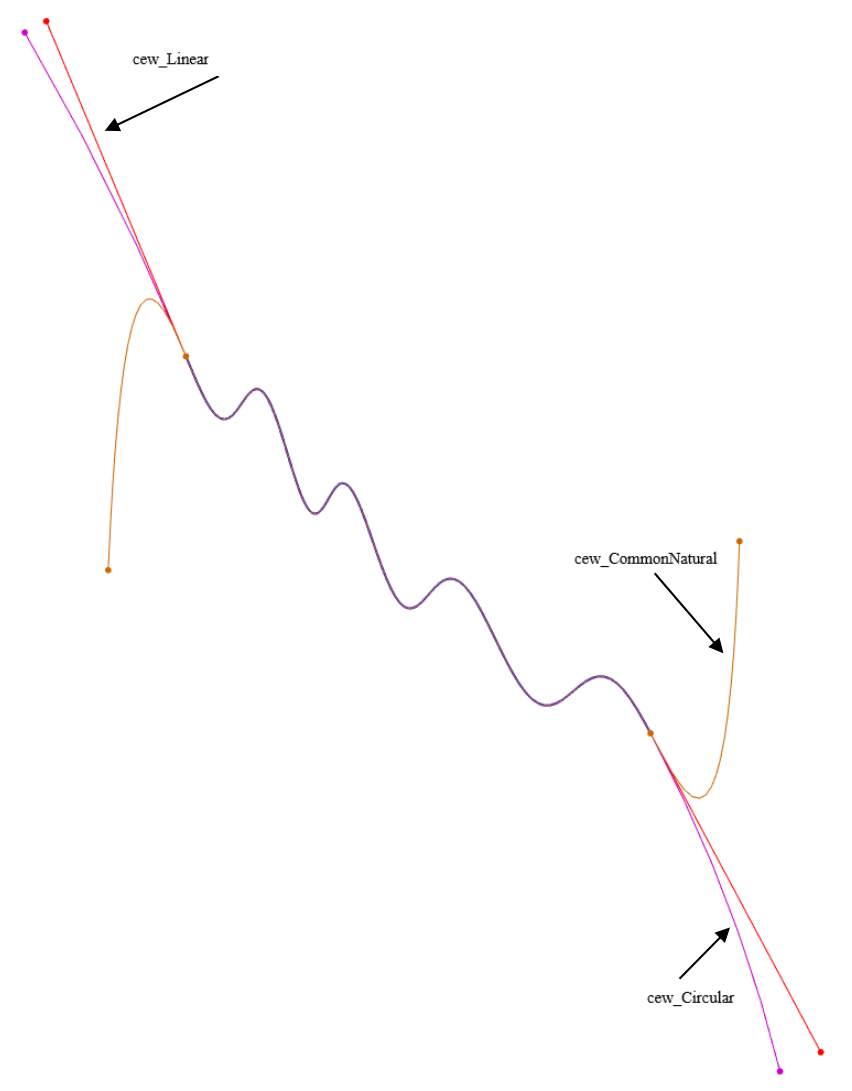
Fig. 2
There are no restrictions on the combinations of extension options for individual endpoints. The extension of each endpoint is performed independently of the other. For example, Fig. 3 shows an elliptic arc extended at the start by 30 units using the linear method and at the end by 60 units using the circular arc method.
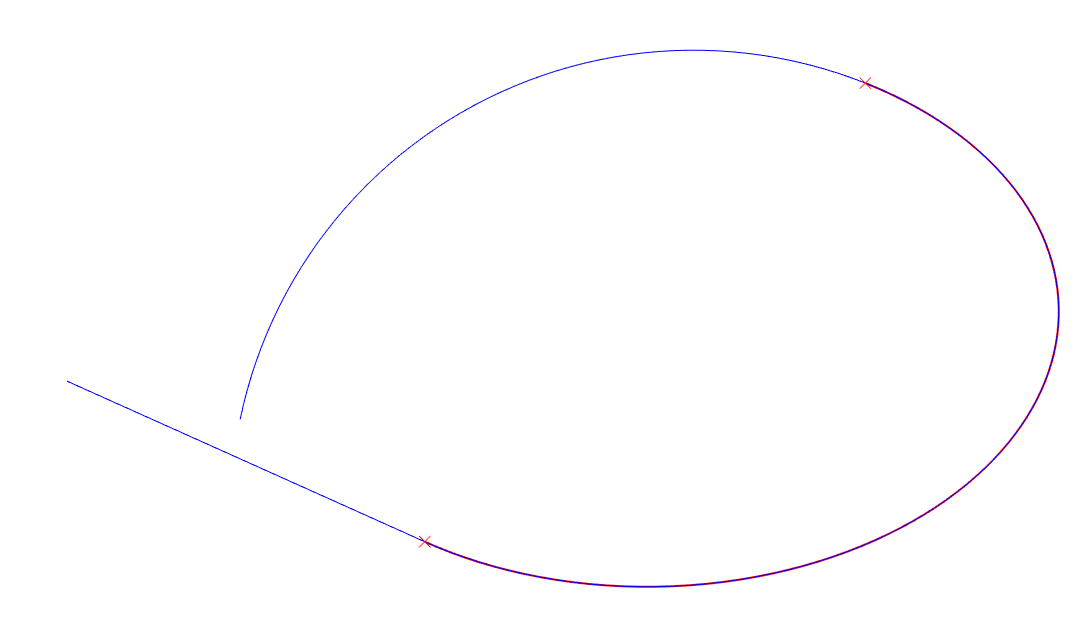
Fig. 3
The ExtendWireFrame() function returns the operation result code as shown in Table:
Operation Result Codes
| Result Type | Result Code | Description |
|---|---|---|
| – | rt_Success | The algorithm completed successfully and a valid result was obtained. |
| Critical errors | rt_CurveError | Unsupported curve type. For example, MbPlaneCurve from which a 2D curve and/or a coordinate system cannot be extracted. |
| rt_Error | Failed to obtain a valid result. | |
| rt_InternalError | Failure in the internal extension algorithms. | |
| rt_MustBeOpen | The source curve is closed. | |
| rt_ParameterError | An invalid value of one of the extension parameters. | |
| rt_TooLargeExtension | The extension length is too large. The threshold value is determined by the geometry of the source curve. | |
| rt_IncorrectData | Incompatible input parameters while the value of each individual parameter is valid. For example, alongSurface = true is set for a non‑surface curve. | |
| rt_BeyondLimitsExtension | Extending the curve beyond the surface boundaries or past a surface pole is not possible. | |
| rt_ContourError | There is a discontinuity at the extension point. | |
| rt_NoCurvesForBuild | No curves are available to build the result. | |
| Non‑critical errors | rt_CurveClosedAtStart | The curve is extended at the start and becomes closed. |
| rt_CurveClosedAtEnd | The curve is extended at the end and becomes closed. | |
| rt_CurveClosedBothSides |
Returned in each of the following cases:
|
For critical errors, the pointer to the resulting wireframe is always null; for non-critical errors, the wireframe is created, but its geometry may not satisfy the requirements.
The following is a typical sequence of steps for calling the wireframe extension algorithm:
Include the required header files:
#include <op_wireframe_parameter.h>
#include <action_wireframe.h>
As an example, extend a wireframe at the end by 100 units using the circular arc method:
double extendLength = 100.0; // Extension length
Initialize the extension parameters for each individual endpoint using objects of the MbCurveExtensionEnds class. If extension of a particular endpoint is not required, its parameters should be initialized using the default constructor.
// No extension at the start. Use the default constructor.
MbCurveExtensionEnds     paramStart;

// Extend at the end using the circular arc method.
MbCurveExtensionCircular paramEnd( extendLength );
Initialize the remaining extension parameters and include in them the endpoint extension objects created in step 3.
bool allowClosure = false;  // Closure permission flag
bool alongSurface = false;  // Along-surface extension flag
MbSNameMaker  name;                  // Operation name maker
MbCurveExtensionParameters3D opParameters( paramStart,
                                           paramEnd,
                                           allowClosure,
                                           alongSurface,
                                           name );
Call the API function that performs the extension:
SPtr<MbWireFrame> scrWireFrame;      // A pre-prepared non-null wireframe

SPtr<MbWireFrame> result( nullptr ); // Extension result
MbResultType      res = ::ExtendWireFrame( scrWireFrame,
                                           cm_Copy,
                                           opParameters,
                                           result );
The resulting wireframe contains the MbExtendCurveCreator builder (a derived class of MbCreator).
In the test application test.exe, wireframe extension is performed via the menu command “Create→Wire frame→Based on wire frame→Extended wire frame”.