Boolean Operation on Revolution Body
The function
MbResultType RevolutionResult(       MbSolid &               solid,
                                     MbeCopyMode             sameShell,
                               const MbSweptData &           sweptData,
                               const MbAxis3D &              axis,
                               const RevolutionValues &      params,
                                     OperationType           oType,
                               const MbSNameMaker &          operNames,
                               const RPArray<MbSNameMaker> & contoursNames,
                                     MbSolid *&              result );
performs the construction of a revolution body using sweptData and a Boolean operation of the given body solid with the constructed body.
The input parameters of the function are:
solid – the given body for the Boolean operation;
sameShell – a copy mode for the given body;
sweptData – parameters defining the generatrix curves for construction of the revolution body;
axis – an axis of revolution;
params – parameters of the revolution construction;
oType – a type of Boolean operation:
bo_Union – union of bodies,
bo_Intersect – intersection of bodies,
bo_Difference – difference of bodies;
operNames – an operation name maker;
contoursNames – name makers for segments of generatrix curves (contours) used in construction of the revolution body.
The output parameter of the function is the constructed body result.
The function returns the operation result code from the MbResultType enumeration (see mb_operation_result.h).
The function is declared in the file action_solid.h.
The function represents a sequential combination of two functions: the RevolutionSolid() function, which performs body construction by revolving the curves sweptData according to the given parameters params around the axis axis, and the BooleanResult() function, which performs the Boolean operation oType on the body solid and the body constructed at the previous step. The RevolutionSolid() function is described in the section Constructing a Revolution Body, and the BooleanResult() function is described in the section Boolean Operation on Bodies.
The parameter sameShell controls the transfer of faces, edges, and vertices from the original body solid to the constructed body result and can take one of four values:
cm_Same = 0 (the shell is not copied);
cm_KeepHistory (the original shell and its copy share common base surfaces, vertices, and faces unchanged by the operation);
cm_KeepSurface (the original shell and its copy share common base surfaces);
cm_Copy (the original shell and its copy have no common data).
The enumeration MbeCopyMode is described in detail in the section Copying a Set of Faces MbFaceShell.
The rotation parameters and the structure of the result are defined by the fields of params: the directions and revolution angles are specified by params.side1 and params.side2, the wall thickness is specified by params.thickness1 and params.thickness2, the shell closedness is specified by params.shellClosed, the merging of similar faces and edges is controlled by the params.MergingFlags() flags, and the topology (spherical or toroidal) is specified by params.shape.
The parameter oType defines the type of Boolean operation and can take three values: bo_Union, bo_Intersect, bo_Difference.
If oType is bo_Union, the union of the body solid and the revolution body is performed.
If oType is bo_Intersect, the intersection of the body solid and the revolution body is performed.
If oType is bo_Difference, the revolution body is subtracted from the body solid.
The parameters operNames and contoursNames provide naming of faces, edges, and vertices of the constructed body.
The RevolutionResult() function has the same capabilities as RevolutionSolid() when constructing a body by revolving curves: the revolved curves can lie on a plane, on a curved surface, or in space. The revolution can be performed in the forward, reverse, or both directions. The body can completely fill closed curves or have a thin wall.
The following examples demonstrate the function’s capabilities related to Boolean operations.
Figure 1 shows the body solid, the generatrix curve included in the sweptData, and the axis of revolution axis:
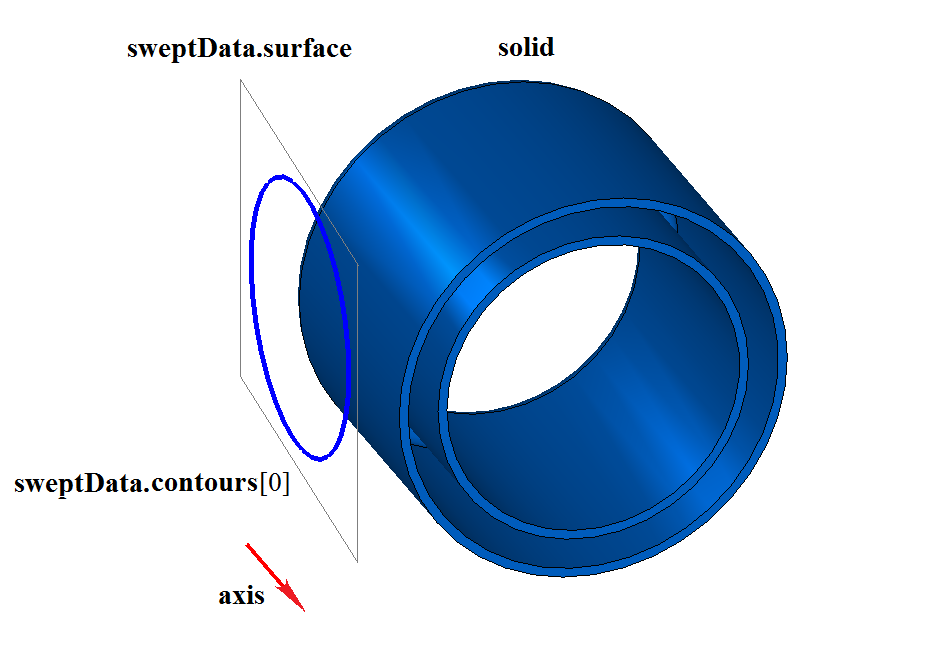
Fig. 1
Figure 2 shows the result of the Boolean union operation of the body solid and a thin-walled revolution body obtained by revolving the generatrix curve sweptData around the axis axis, shown in Figure 1:
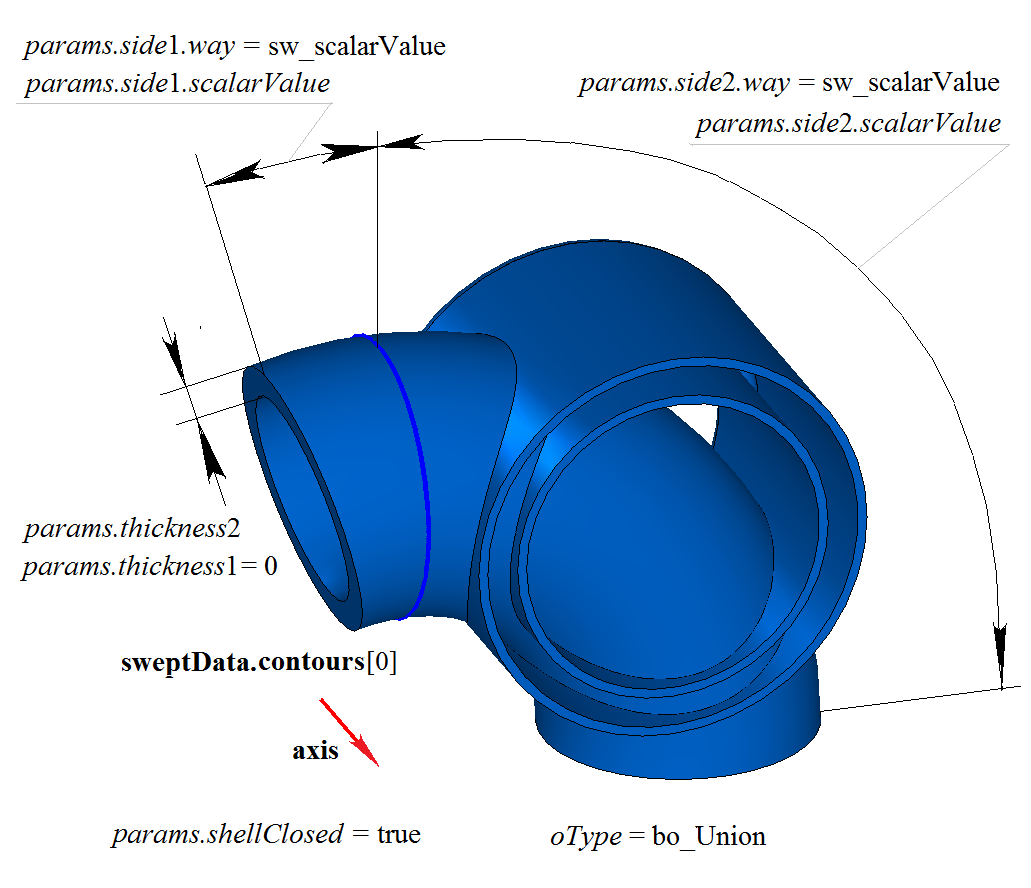
Fig. 2
Figure 3 shows the result of the Boolean union operation of the body solid and a thin-walled revolution body obtained by revolving the generatrix curve sweptData around the axis, shown in Figure 1. The revolution of the generatrix curve is performed in the reverse direction with the option “Up to Surface” (params.side2.way = sw_surface).
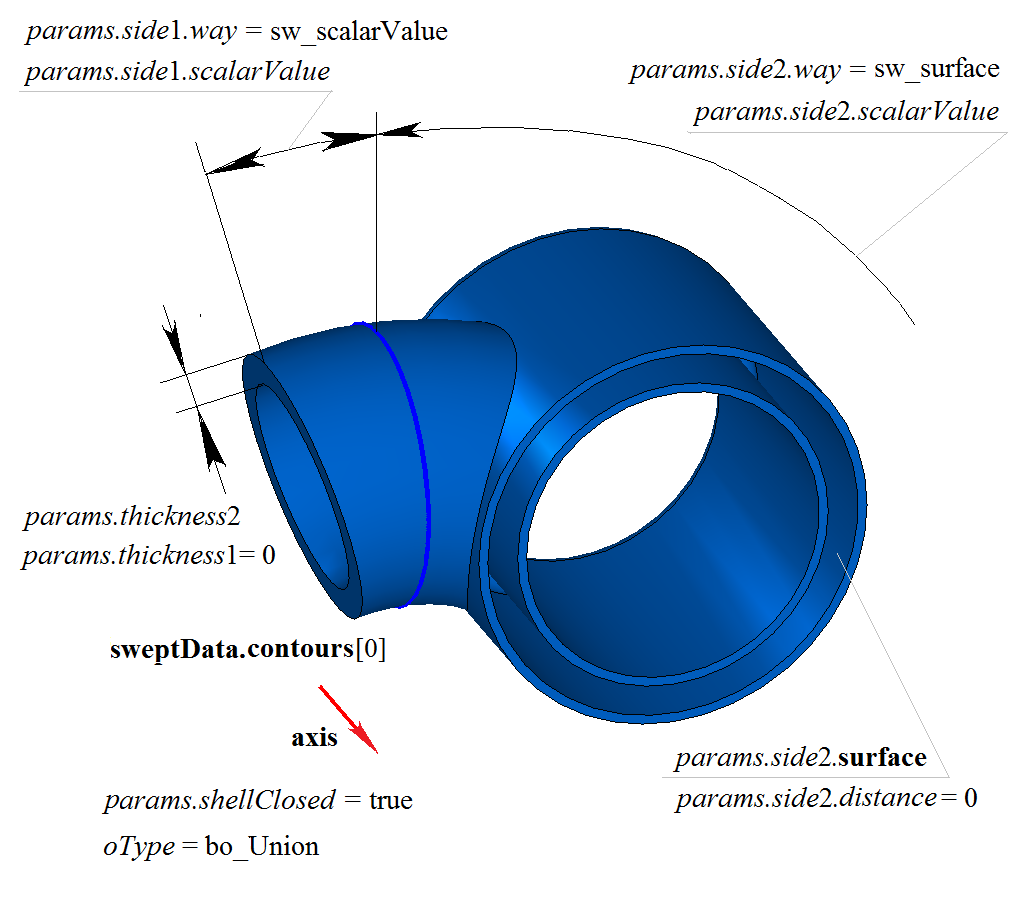
Fig. 3
Figure 4 shows the result of the Boolean difference operation of the body solid and the revolution body obtained by revolving the generatrix curve sweptData around the axis axis, shown in Figure 1:
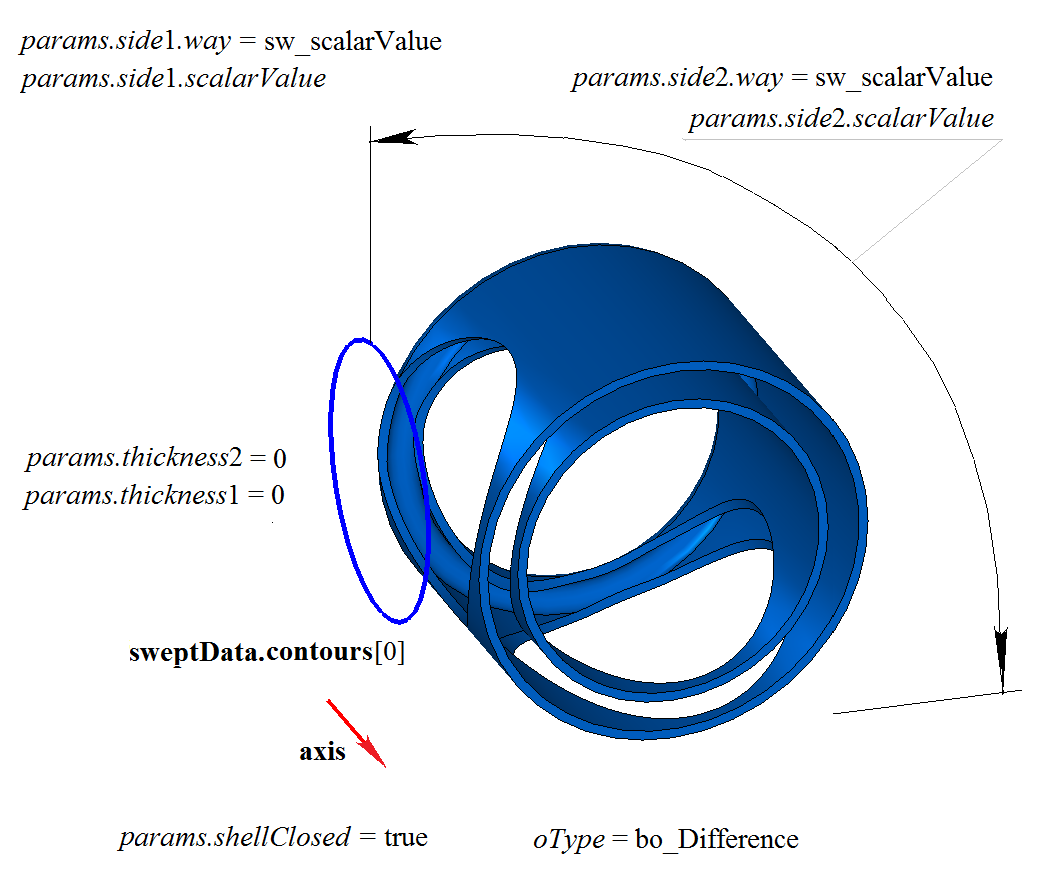
Fig. 4
Figure 5 shows the result of the Boolean difference operation of the body solid and the revolution body obtained by revolving the generatrix curve sweptData around the axis axis, shown in Figure 1. The revolution of the generatrix curve is performed in the reverse direction with the option “Up to Surface” (params.side2.way = sw_surface).
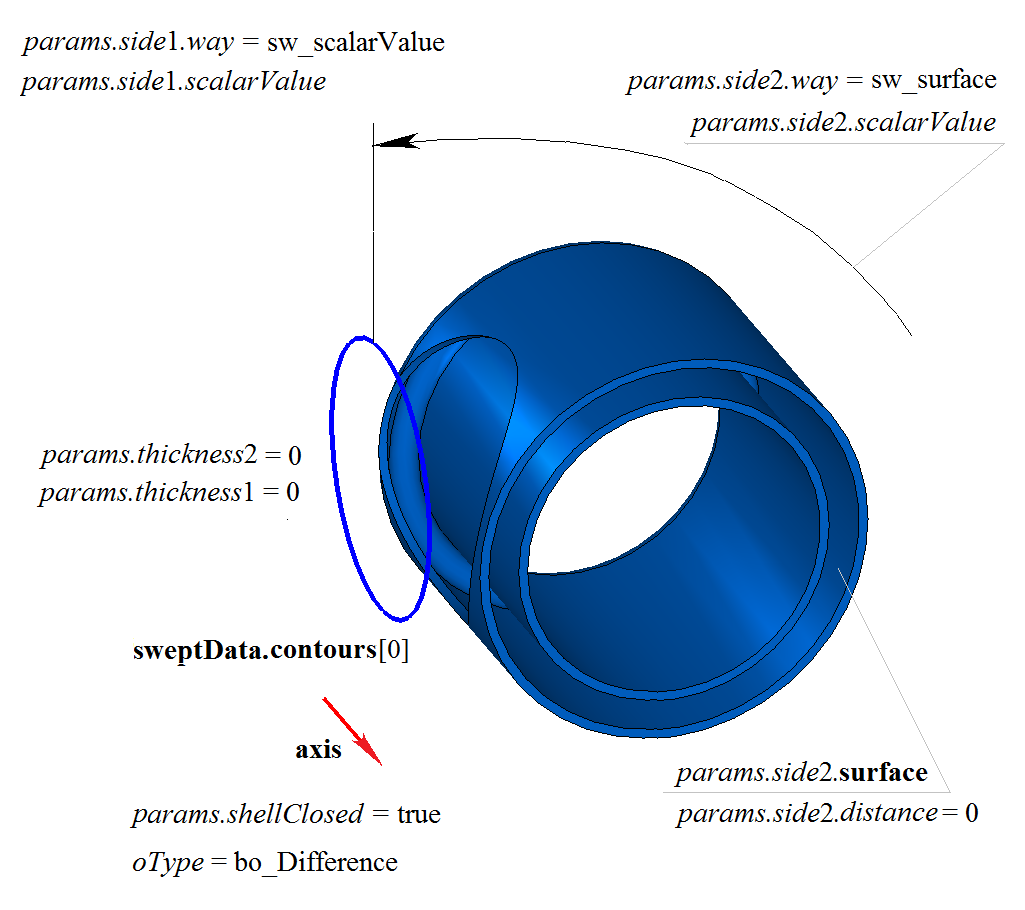
Fig. 5
Figure 6 shows the result of the Boolean intersection operation of the body solid and the revolution body obtained by revolving the generatrix curve sweptData around the axis, shown in Figure 1:
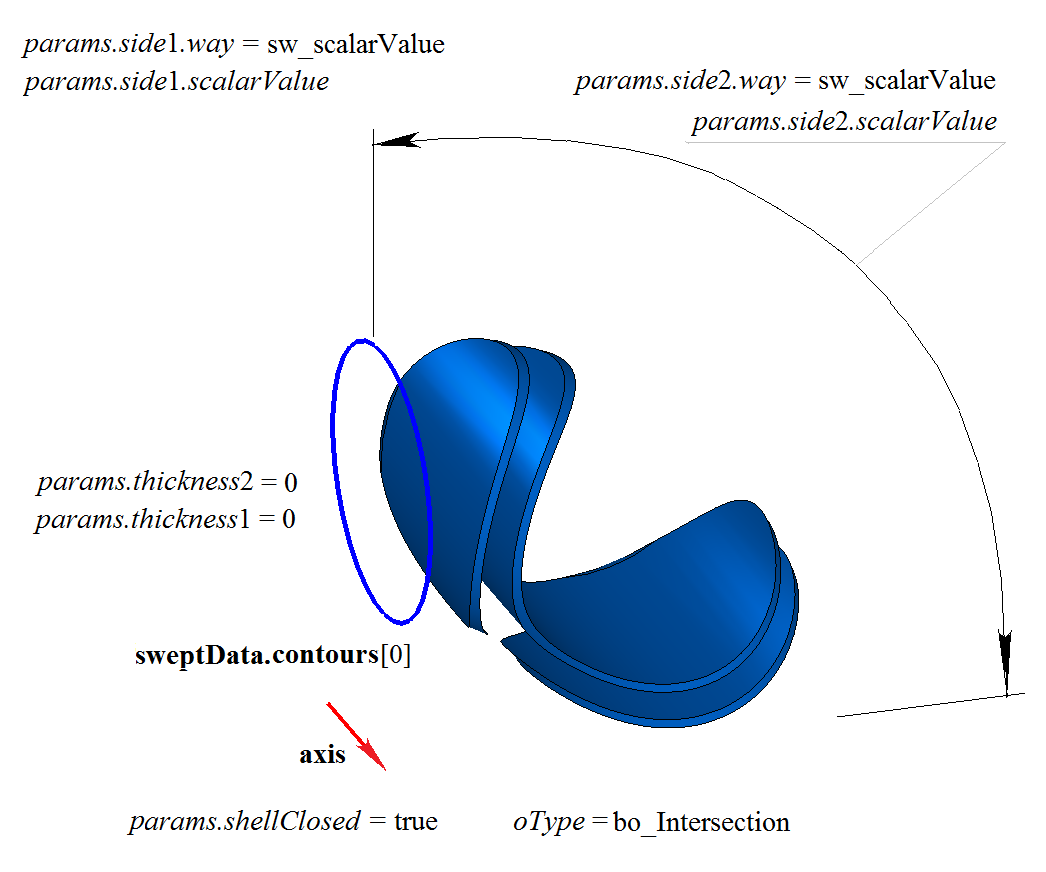
Fig. 6
Figure 7 shows the result of the Boolean intersection operation of the body solid and the revolution body obtained by revolving the generatrix curve sweptData around the axis, shown in Figure 1. The revolution of the generatrix curve is performed in the reverse direction with the option “Up to Surface” (params.side2.way = sw_surface).
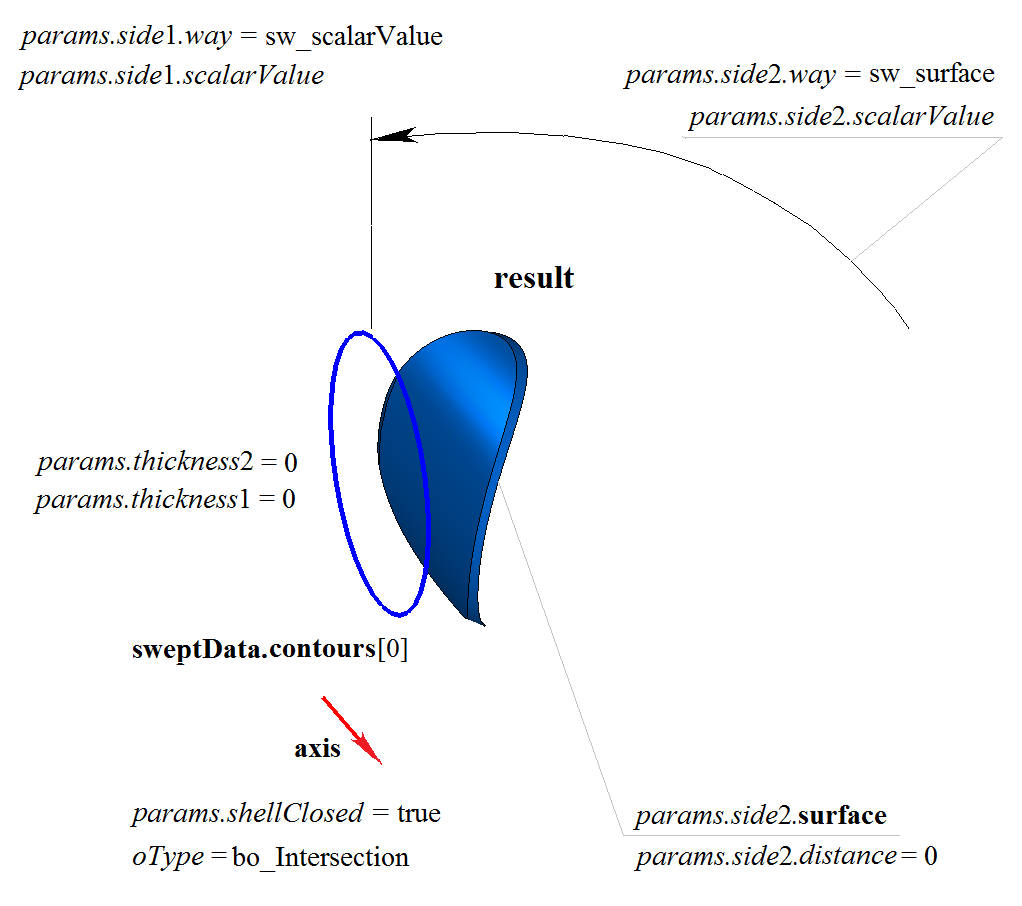
Fig. 7
The function RevolutionResult() adds the MbCurveRevolutionSolid builder to the construction log, which contains all necessary data for performing the operation. The builder MbCurveRevolutionSolid is declared in the file cr_revolution_solid.h.
In the test application test.exe, the Boolean operation with the constructed revolution body is performed by menu commands:
Create→Solid→As union with a solid→Revolving a Curve revolution;
Create→Solid→As subtraction with a solid→Revolving a Curve revolution;
Create→Solid→As intersection with a solid→Revolving a Curve revolution.