Format for Storing Geometric Model
Notions and Terms
Recall that serialization is a process of translating an object (class) to a sequence of bytes for storing it in a memory buffer (a file). Deserialization is an opposite process of restoring an object from a sequence of bytes.
Stream operations are operations of writing and reading a model and its objects in a serialized form (work with write and read streams).
Objects that can be serialized (represented as a sequence of bytes) are called streaming objects.
A continuous memory block (a sequence of bytes) is called a cluster, and a set of clusters is called a file space. A file space has a single point of writing (reading) – a position in a current cluster.
Geometric Model Serialization
Geometric model C3D can be serialized (represented as a sequence of bytes) to a set of file spaces.
All main objects of the geometric model are streaming, that is, they can write and read their data in a file space. Each model object writes itself starting from the last unfinished cluster of the current file space.
Writing a geometric model starts with the MbModel object.
Each model object first writes data of its parent object (if it exists), then its own data and objects it contains or references.
After a geometric model is fully serialized to a set of file spaces, using a special function, a single sequential memory buffer is created to which a special header is written and data of all clusters (from all file spaces) are sequentially copied.
The memory buffer created in this way contains geometric model data as a sequence of bytes and can be transferred to another location (another application) via memory for subsequent restoring of the model or can be saved to a disk file.
Compact Format C3D
The compact format provides a compact and fast storing of geometric model data to a memory buffer (file) and fast reading of the whole model from the memory buffer (file).
Main features of the compact format:
Minimal overhead while writing and reading a model.
Compact data storage.
Allowed reading of the whole model.
Information about the model structure and about model objects is available only after reading the whole model.
It is impossible to read model objects in an arbitrary order or read a few selected objects.
The compact format puts all model data in a single file space, that is, assumes only one point of data writing or reading – a current cluster of the given file space.
Fig. 1 shows the structure of serialized data of a geometric model before saving it in a sequential memory buffer when using the compact format.
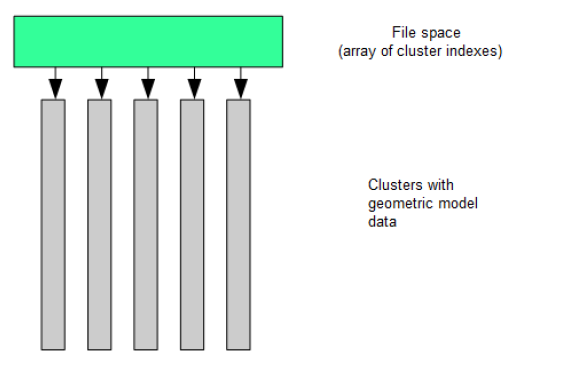
Fig. 1
While writing a model, if a geometric object contains another object or references another object, then the latter object is written inside the referring object.
An object referenced by multiple objects is declared registered. While writing first time, such object is registered in a special table of registered objects. All subsequent objects that refer to this registered object contain only a reference to the record in the table.
Fig. 2 shows a structure of geometric model data in a sequential memory buffer for the compact format.
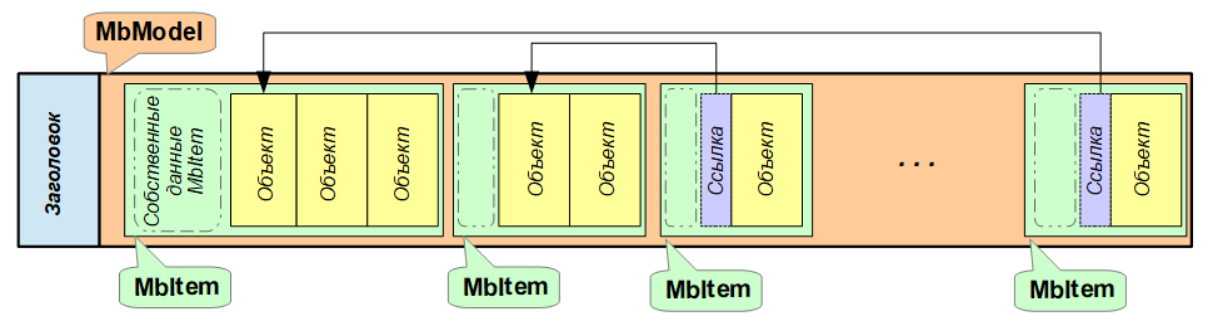
Fig. 2
Extended Format C3D
The extended format provides independent storing of geometric model objects. In addition to the model objects data, the extended format keeps objects storage positions in the buffer and a brief table of contents of the model, which allows obtaining information about the model structure without fully reading it and also provides the ability of selective reading of the model objects.
Main features of the extended format:
Independent storage of objects, which provides the ability of selective reading of the model objects.
Support of a table of contents for a model which keeps information about the model objects and links to their storage positions.
Some increase in the size of the stored data.
The extended format writes model objects into several file spaces, that is, supports multiple writing (reading) points – the current cluster in each file space.
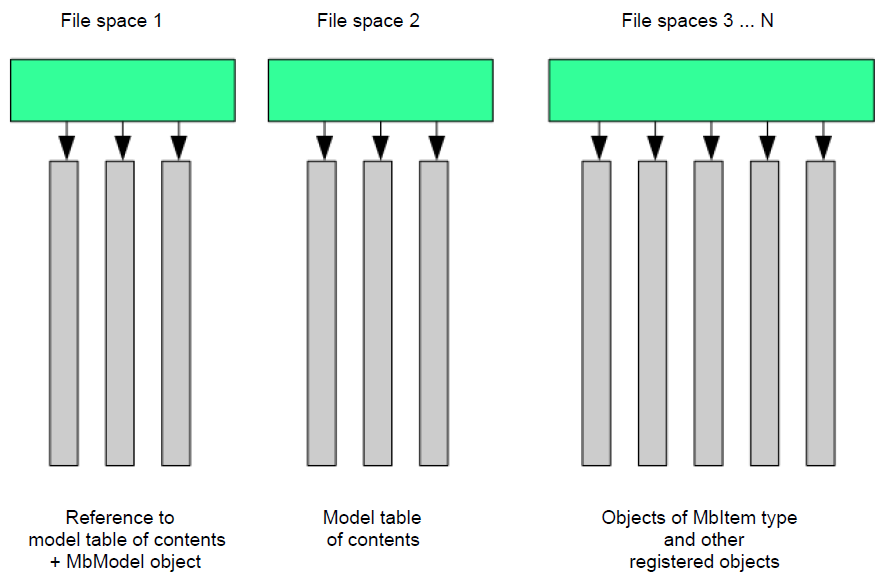
Fig. 3
Fig. 3 shows the structure of serialized data of a geometric model before saving it to a sequential memory buffer when using the extended format.
Objects of each level of the model are written to a separate file space (a number of file spaces used is determined by the nesting depth of the model objects).
Fig. 4 shows a structure of geometric model data in a sequential memory buffer for the extended format.
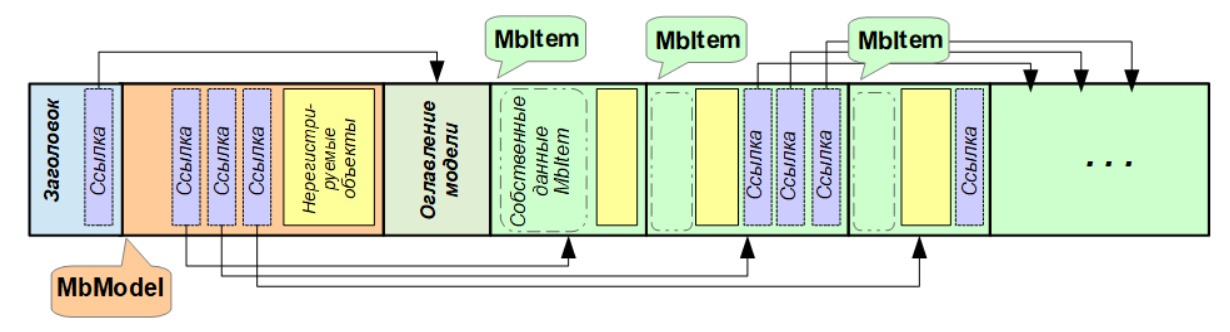
Fig. 4
Model Table of Contents
The extended format implements generation of a geometric model tree and writing/reading it in a memory buffer (file).
The tree is created for all objects of type MbItem of the geometric model and is written as a table of contents of the model in a separate file space, a link to which is added to the file header.
The table of contents of the model, written in the file, contains:
Data of model tree nodes.
Each tree node stores information for one object of the geometric model. A node keeps the following data:
A unique ID of the node in the model tree.
Object type (MbeSpaceType).
Object name (SimpleName).
Object gabarit.
Information about the object attributes.
A list of the immediate descendants of the node.
Writing/reading position in a file.
Information about the model tree roots.
The model table of contents can be read separately, which allows obtaining information about the model structure and its main objects without full model loading. Using data of the model table of contents, it is possible to choose and separately read any model objects listed in the table of contents.
Working with Embodiments
The extended C3D format provides an opportunity to work with embodiments (variants of model implementation):
A model with embodiments should be saved (serialized) to a file using the writer_ex class (in the extended format) and should be read using the reader_ex class.
Upon reading a model catalog from the file with embodiments, it is possible to look through the embodiments hierarchy, select an embodiment and read its contents as a separate model.
When reading a file with embodiments without use of a model catalog (for example, by direct call to the ReadModelItems() function), the first in order (default) embodiment will be read.
A model with embodiments is created as an MbModel object, which contains a set of assemblies ( MbAssembly objects). Each assembly represents one embodiment (contains objects of one embodiment) and has an attribute of the at_Embodiment type. The first in order embodiment in the model is the default embodiment.
An assembly is considered an embodiment and is treated as an embodiment only if it is located directly in the MbModel object (is one of the roots of the model tree) and has an attribute of the at_Embodiment type. MbAssembly objects which are located inside embodiments (deeper than the root in the model tree) are treated as regular assemblies.
An attribute of the at_Embodiment type serves as an indicator of an embodiment. It must contain the name (SimpleName) of the current embodiment and the name (SimpleName) of the parent embodiment (or UNDEFINED_SNAME if there is no parent).
To provide the ability to view the hierarchy of embodiments and selective reading, a model with embodiments should be serialized using the writer_ex class. After that the model with embodiments should be read using the reader_ex class.
When reading a C3D file with embodiments, only one embodiment can be read.
If a file with embodiments is read in a usual way, that is, without use of the model tree (for example, using direct call to the ReadModelItems() function), then the first (default) embodiment will be read.
In order to read any other embodiment, the model tree should be read first. Then, using the model tree, it is possible to look through the hierarchy of embodiments and load the selected one as a separate model.