Cutting a Body into Parts
The function
MbResultType SolidCutting( const c3d::SolidSPtr &        solid,
                                 MbeCopyMode             sameShell,
                           const MbShellCuttingParams &  cuttingParams,
                                 c3d::SolidsSPtrVector & results );
cuts off part of a body by an intersecting surface or shell.
The input parameters of the function are:
srcSolid – an original body;
sameShell – a copy mode of the original body;
cuttingParams – parameters of the operation.
The output parameter of the function is the constructed bodies results.
The function returns an operation result code from the MbResultType enumeration (see mb_operation_result.h).
The function is declared in the action_solid.h file.
To initialize objects cuttingParams with operation parameters, the following default constructor is defined in the MbShellCuttingParams class:
MbShellCuttingParams(       int                  part,
                      const MbMergingFlags &     mergingFlags,
                            bool                 cutAsClosed,
                      const MbSNameMaker &       snMaker,
                            IProgressIndicator * prog = nullptr )

: cutterData  (                      )
, booleanFlags(                      )
, nameMaker   ( &snMaker.Duplicate() )
, retainedPart( ts_neutral           )
, prolongState(                      )
, progress    ( prog                 )
{
    booleanFlags.InitCutting( cutAsClosed );
    booleanFlags.SetMerging( mergingFlags );
    SetRetainedPart( part );
}
part – a retained part of the original shell (+1, 0, -1), 0 – keep both parts;
mergingFlags – flags for merging shell elements;
cutAsClosed – a flag for building a closed shell;
snMaker – an operation namer.
Cutting a Body by a Flat Contour
The function constructs a non-closed shell by extruding in direction dir a two-dimensional contour contour, located in the XY plane of the local coordinate system place, and performs a Boolean intersection operation of the original body solid with the non-closed shell. If the vector dir equals zero, the contour extrusion is performed along the vector place.axisZ.
For the operation to execute, the cutting contour must fully intersect the projection of the original body onto the XY plane of the local coordinate system place in the direction of the extrusion vector. The extrusion length of the contour is calculated so that the non-closed shell completely intersects the original body.
To initialize objects cuttingParams of the function with operation parameters, the following contour constructors are defined in the MbShellCuttingParams class:
The constructor with the ability to save a part:
MbShellCuttingParams( const MbPlacement3D &      place,
                      const MbContour &          contour,
                            bool                 sameContour,
                      const MbVector3D &         dir,
                            int                  part,
                      const MbMergingFlags &     mergingFlags,
                            bool                 cutAsClosed,
                      const MbSNameMaker &       snMaker,
                            IProgressIndicator * prog = nullptr )

: cutterData  ( place, dir, contour, sameContour )
, booleanFlags(                      )
, nameMaker   ( &snMaker.Duplicate() )
, retainedPart( ts_neutral           )
, prolongState(                      )
, progress    ( prog                 )
{
    booleanFlags.InitCutting( cutAsClosed );
    booleanFlags.SetMerging( mergingFlags );
    SetRetainedPart( part );
}
The constructor without selecting a saved part (all parts are saved by default):
MbShellCuttingParams( const MbPlacement3D &      place,
                      const MbContour &          contour,
                            bool                 sameContour,
                      const MbVector3D &         dir,
                      const MbMergingFlags &     mergingFlags,
                            bool                 cutAsClosed,
                      const MbSNameMaker &       snMaker,
                            IProgressIndicator * prog = nullptr )

: cutterData  ( place, dir, contour, sameContour )
, booleanFlags(                      )
, nameMaker   ( &snMaker.Duplicate() )
, retainedPart( ts_neutral           )
, prolongState(                      )
, progress    ( prog                 )
{
    booleanFlags.InitCutting( cutAsClosed );
    booleanFlags.SetMerging( mergingFlags );
}
where
place – a local coordinate system in the XY plane of which the two-dimensional contour is located;
contour – a two-dimensional contour for extrusion is located in the XY plane of the local coordinate system place;
sameContour – the flag to use the original contour (true) or its copy (false);
dir – a direction of contour extrusion;
part – a retained part of the original body (+1, 0, -1), 0 – keep both parts;
mergingFlags – flags for merging shell elements;
cutAsClosed – the flag for building a closed shell;
snMaker – the operation namer.
The parameter part determines the retained part of the original body solid:
if part = +1, the part of the body located to the right of the contour is retained when viewing along the contour towards the place.axisZ axis;
if part = -1, the part of the body located to the left of the contour is retained when viewing along the contour towards the place.axisZ axis;
if part = 0, both parts of the body are retained.
The parameter mergingFlags controls the merging of similar faces and edges of the resulting shell.
The parameter cutAsClosed indicates how the original body solid should be treated: as closed or non-closed. When cutAsClosed = true, the operation is performed on the set of points located inside and on the surface of the body. When cutAsClosed = false, the operation is performed on the set of points located on the body surface.
The parameter snMaker provides naming of faces, edges and vertices of the constructed body.
Fig. 1 shows the original body solid, the cutting contour contour and the XY plane of the local coordinate system place.
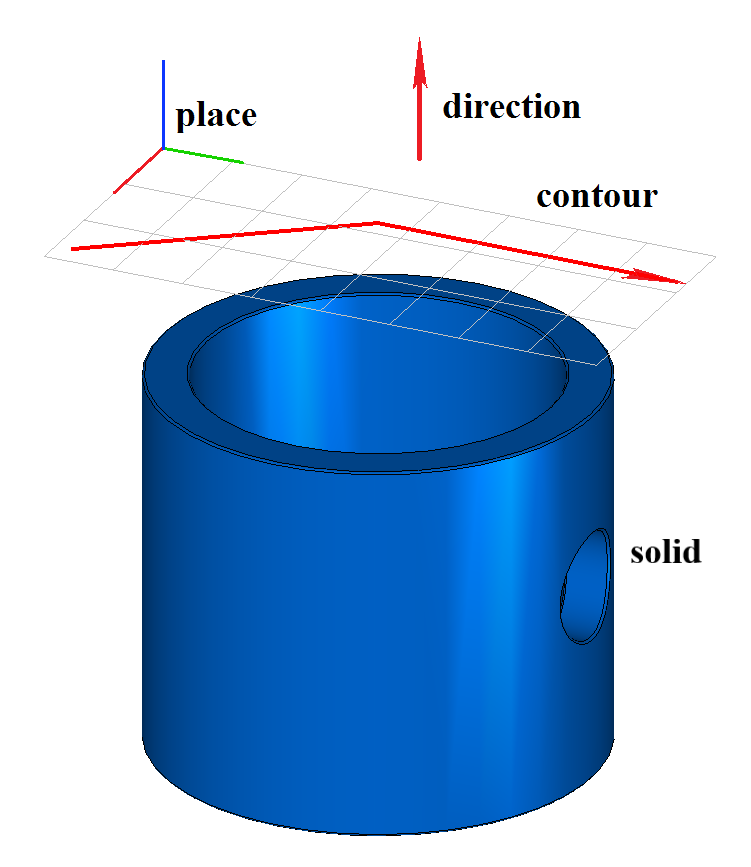
Fig. 1
Fig. 2 shows the constructed body result when part = +1 and cutAsClosed = true. Fig. 3 shows the constructed body result when part = -1 and cutAsClosed = true:
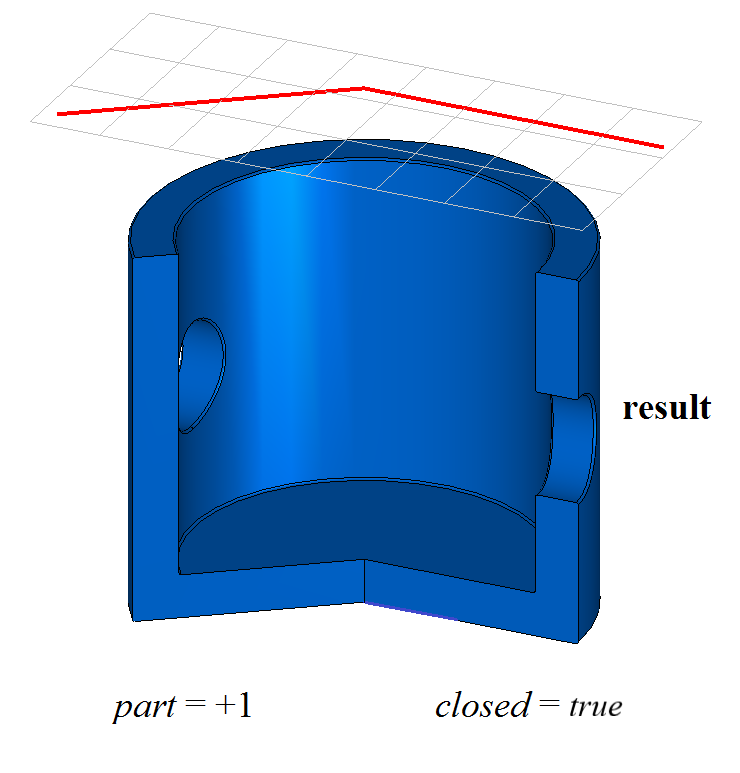
Fig. 2
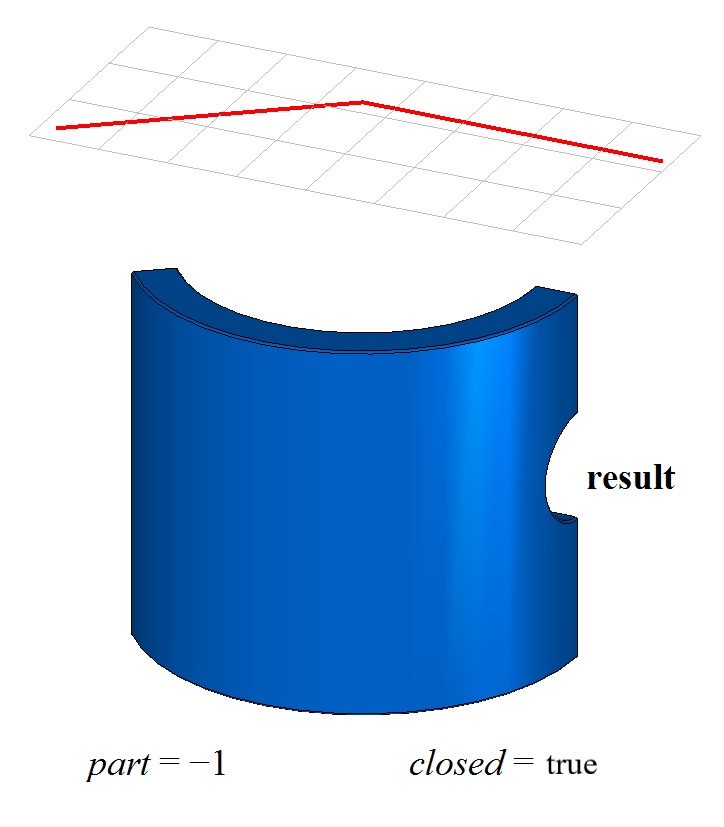
Fig. 3
Fig. 4 shows the constructed body result when part = +1 and cutAsClosed = false:
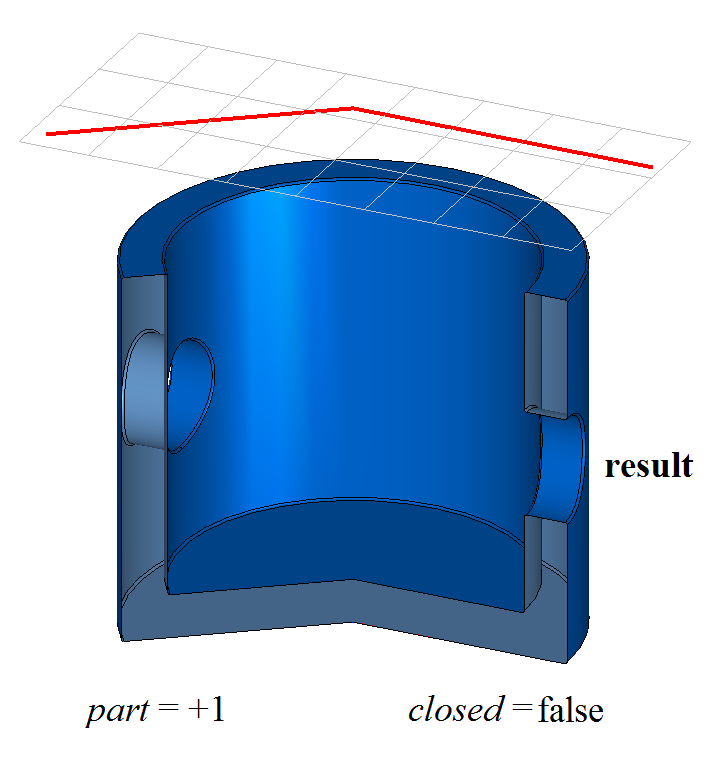
Fig. 4
When part = 0, the function constructs the body result, into which all parts of the original body solid obtained after cutting are included.
To divide the body result into parts, use the functions DetachParts() or CreateParts(), described in section Divide a Body into Disconnected Parts.
When using the constructor by contour:
MbShellCuttingParams( const MbPlacement3D &      place,
                      const MbContour &          contour,
                            bool                 sameContour,
                      const MbVector3D &         dir,
                      const MbMergingFlags &     mergingFlags,
                            bool                 cutAsClosed,
                      const MbSNameMaker &       snMaker,
                            IProgressIndicator * prog = nullptr );
the function SolidCutting() cuts the body by a surface obtained by extruding a flat contour and constructs separate bodies from all parts. Fig. 5 shows the body result constructed in this way when cutAsClosed = true:
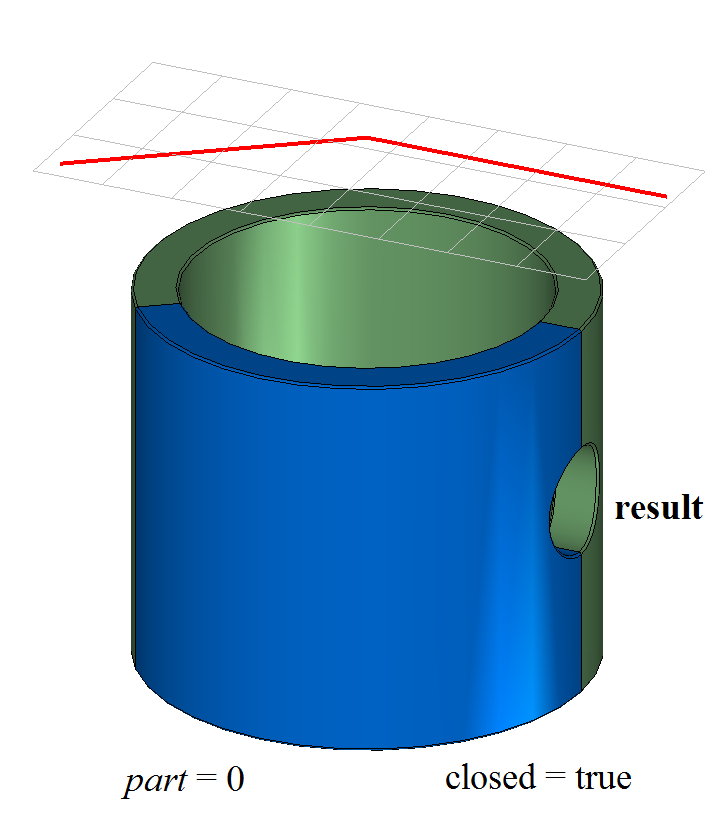
Fig. 5
The function SolidCutting() adds to the history tree of the constructed body the creator MbCuttingSolid, which contains all necessary data for performing the operation. The creator MbCuttingSolid is declared in the file cr_cutting_solid.h.
In the test application test.exe, cutting a body by a flat contour is performed using the menu commands “Create→Solid→Based on a solid→Cut by a 2D-Curve” and “Create→Shell→Based on a shell→Cut by a curve”.
Cutting a Body by a Surface
The function constructs a non-closed shell with one face based on the cutting surface surface and performs a Boolean intersection operation of the original body solid with the non-closed shell. For the operation to execute, the cutting surface must fully intersect the original body.
To initialize objects cuttingParams of the function with operation parameters, the following surface constructors are defined in the MbShellCuttingParams class:
MbShellCuttingParams( const MbSurface &          surface,
                            bool                 sameSurface,
                            int                  part,
                      const MbMergingFlags &     mergingFlags,
                            bool                 cutAsClosed,
                      const MbSNameMaker &       snMaker,
                            IProgressIndicator * prog = nullptr )

: cutterData  ( surface, sameSurface )
, booleanFlags(                      )
, nameMaker   ( &snMaker.Duplicate() )
, retainedPart( ts_neutral           )
, prolongState(                      )
, progress    ( prog                 )
{
    booleanFlags.InitCutting( cutAsClosed );
    booleanFlags.SetMerging( mergingFlags );
    SetRetainedPart( part );
}
MbShellCuttingParams( const MbSurface &          surface,
                            bool                 sameSurface,
                      const MbMergingFlags &     mergingFlags,
                            bool                 cutAsClosed,
                      const MbSNameMaker &       snMaker,
                            IProgressIndicator * prog = nullptr )

: cutterData  ( surface, sameSurface )
, booleanFlags(                      )
, nameMaker   ( &snMaker.Duplicate() )
, retainedPart( ts_neutral           )
, prolongState(                      )
, progress    ( prog                 )
{
    booleanFlags.InitCutting( cutAsClosed );
    booleanFlags.SetMerging( mergingFlags );
}
surface – a cutting surface;
sameSurface – the flag to use the original surface (true) or its copy (false);
part – a retained part of the original body (+1, 0, -1), 0 – keep both parts;
mergingFlags – flags for merging shell elements;
cutAsClosed – the flag for building a closed shell;
snMaker – the operation namer.
The parameter part determines the retained part of the original body solid:
if part = +1, the part of the body located above the surface is retained (on the side towards which the surface normal is directed);
if part = -1, the part of the body located below the surface is retained;
if part = 0, both parts of the body are retained.
The parameter cutAsClosed indicates how the original body solid should be treated: as closed or non-closed:
if cutAsClosed = true, the operation is performed on the set of points located inside and on the surface of the body;
if cutAsClosed = false, the operation is performed on the set of points located on the body surface.
The parameter snMaker provides naming of faces, edges and vertices of the constructed body.
Fig. 6 shows the original body solid and the cutting surface surface.
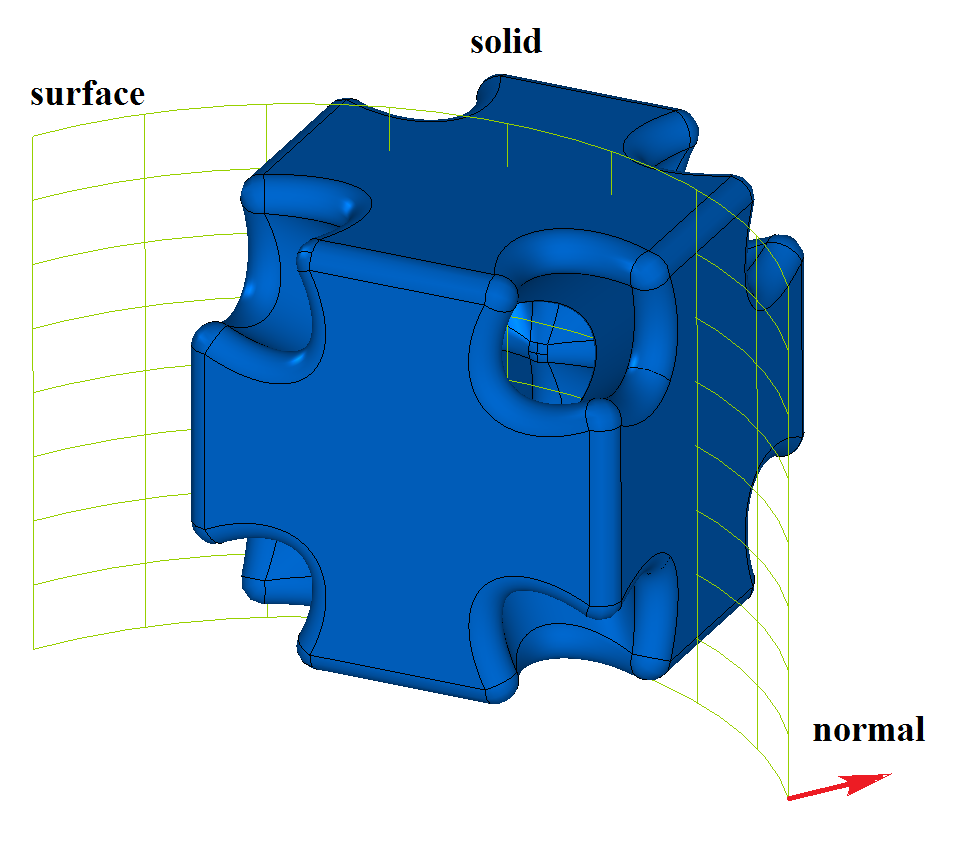
Fig. 6
Fig. 7 shows the constructed body result when part = +1 and cutAsClosed = true. Fig. 8 shows the constructed body result when part = -1 and cutAsClosed = true.
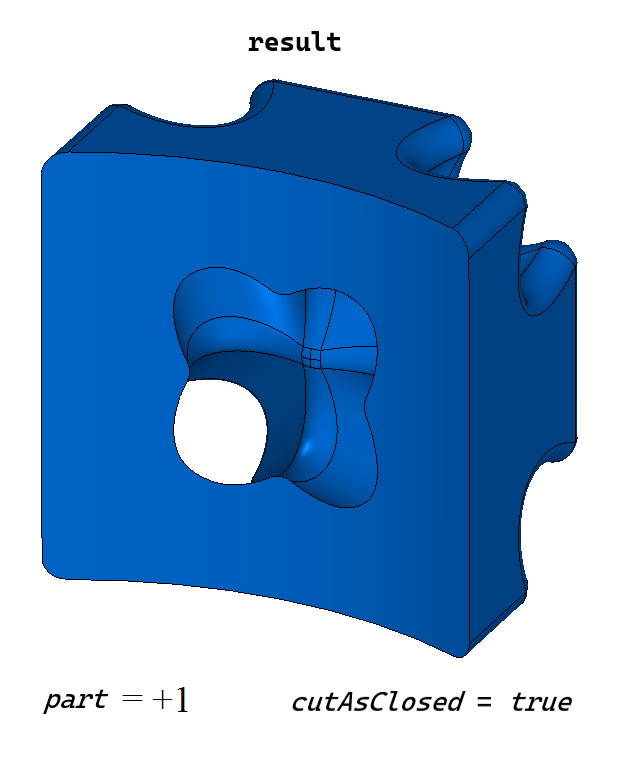
Fig. 7
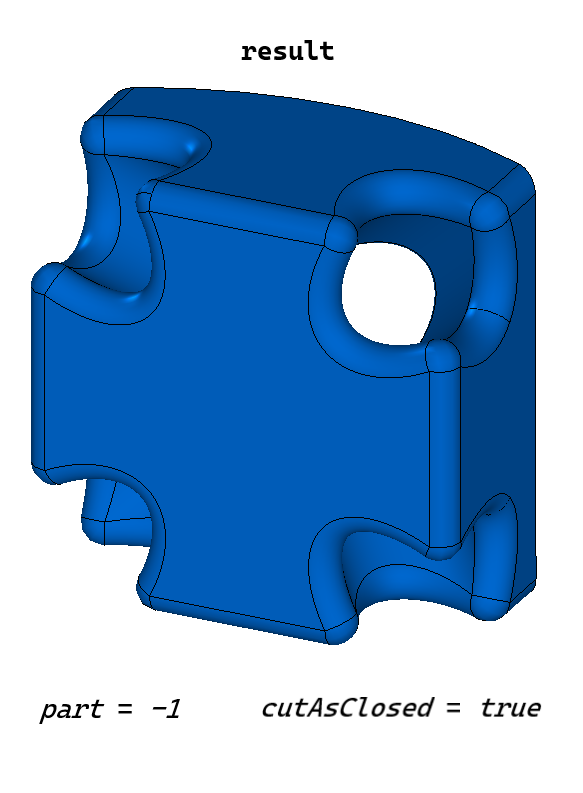
Fig. 8
Fig. 9 shows the constructed body result when part = +1 and cutAsClosed = false:
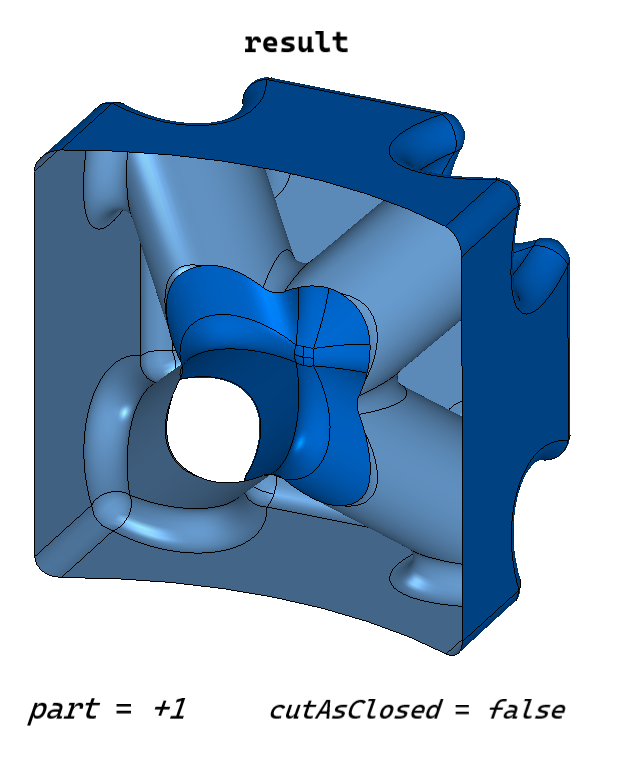
Fig. 9
When part = 0, the function constructs the body result, into which all parts of the original body solid obtained after cutting are included.
To divide the body result into parts, use the functions DetachParts() or CreateParts(), described in section Divide a Body into Disconnected Parts.
When using the surface constructor
MbShellCuttingParams( const MbSurface &          surface,
                            bool                 sameSurface,
                      const MbMergingFlags &     mergingFlags,
                            bool                 cutAsClosed,
                      const MbSNameMaker &       snMaker,
                            IProgressIndicator * prog = nullptr )
the function cuts the body by an intersecting surface and constructs separate bodies from all parts. Fig. 10 shows the body result constructed in this way when cutAsClosed = true:
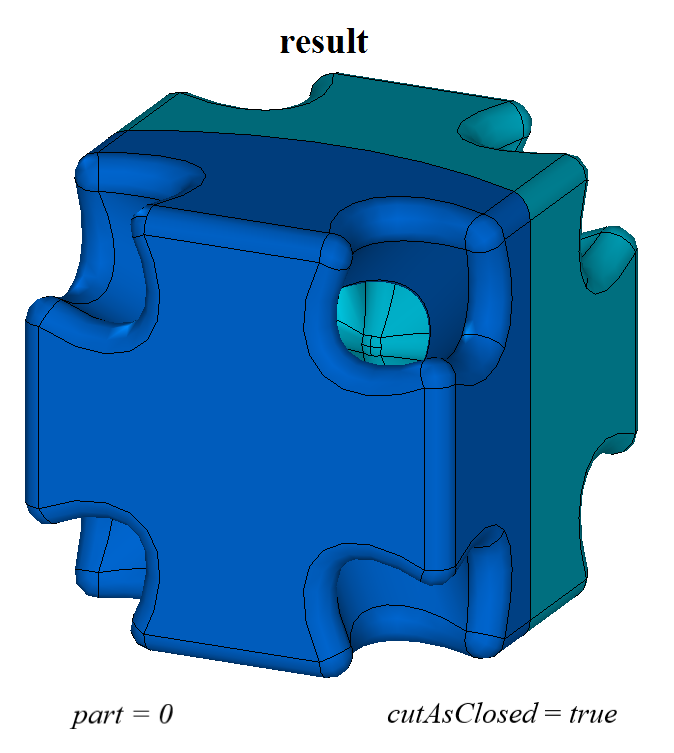
Fig. 10
In the test application test.exe, cutting a body by a surface is performed using the menu commands “Create→Solid→Based on a body→Cut by a surface” and “Create→Shell→Based on a shell→Cut by a surface”.
Cutting a Body by a Shell
The function performs cutting of the original body solid by an intersecting shell cutSolid. For the operation to execute, the cutting shell cutSolid must fully intersect the original body solid.
To initialize objects cuttingParams of the function with operation parameters, the following shell constructor is defined in the MbShellCuttingParams class:
MbShellCuttingParams( const MbSolid &            solid,
                            bool                 sameSolid,
                            int                  part,
                      const MbMergingFlags &     mergingFlags,
                            bool                 cutAsClosed,
                      const MbSNameMaker &       snMaker,
                            IProgressIndicator * prog = nullptr )

: cutterData  ( solid, sameSolid, true )
, booleanFlags(                        )
, nameMaker   ( &snMaker.Duplicate()   )
, retainedPart( ts_neutral             )
, prolongState(                        )
, progress    ( prog                   )
{
    booleanFlags.InitCutting( cutAsClosed );
    booleanFlags.SetMerging( mergingFlags );
    SetRetainedPart( part );
}
solid – a cutting shell;
sameSolid – the flag to use the original body (true) or its copy (false);
part – a retained part of the original body (+1, 0, -1), 0 – keep both parts;
mergingFlags – flags for merging shell elements;
cutAsClosed – the flag for building a closed shell;
snMaker – the namer of the operation.
The parameter part determines the retained part of the original body solid:
if part = +1, the part of the body located outside the shell is retained;
if part = -1, the part of the body located inside the shell is retained;
if part = 0, both parts of the body are retained.
The parameter cutAsClosed indicates how the original body solid should be treated: as closed or non-closed:
if cutAsClosed = true, the operation is performed on the set of points located inside and on the surface of the body;
if cutAsClosed = false, the operation is performed on the set of points located on the body surface.
The parameter snMaker provides naming of faces, edges and vertices of the constructed body.
Fig. 11 shows the original body solid and the cutting shell cutSolid.
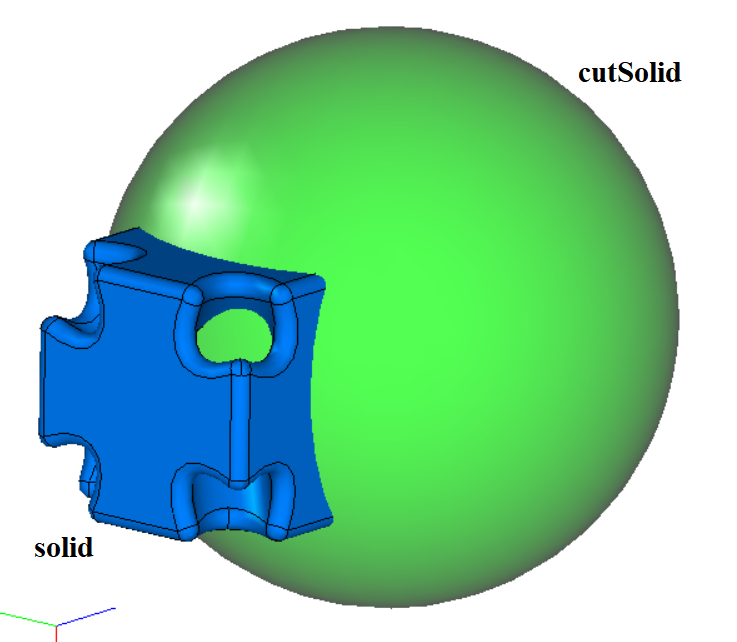
Fig. 11
Fig. 12 shows the constructed body result when part = +1 and cutAsClosed = true. Fig. 13 shows the constructed body result when part = -1 and cutAsClosed = true:
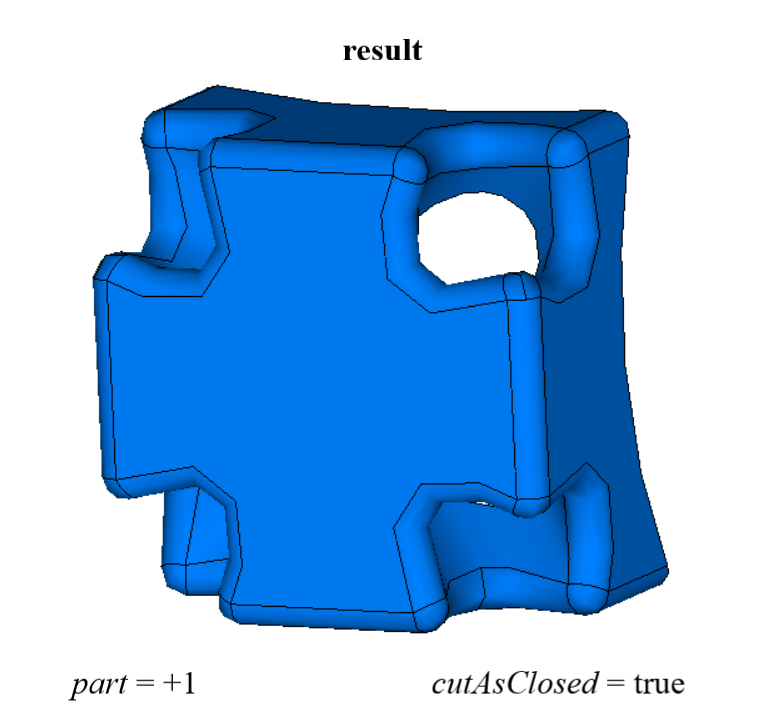
Fig. 12
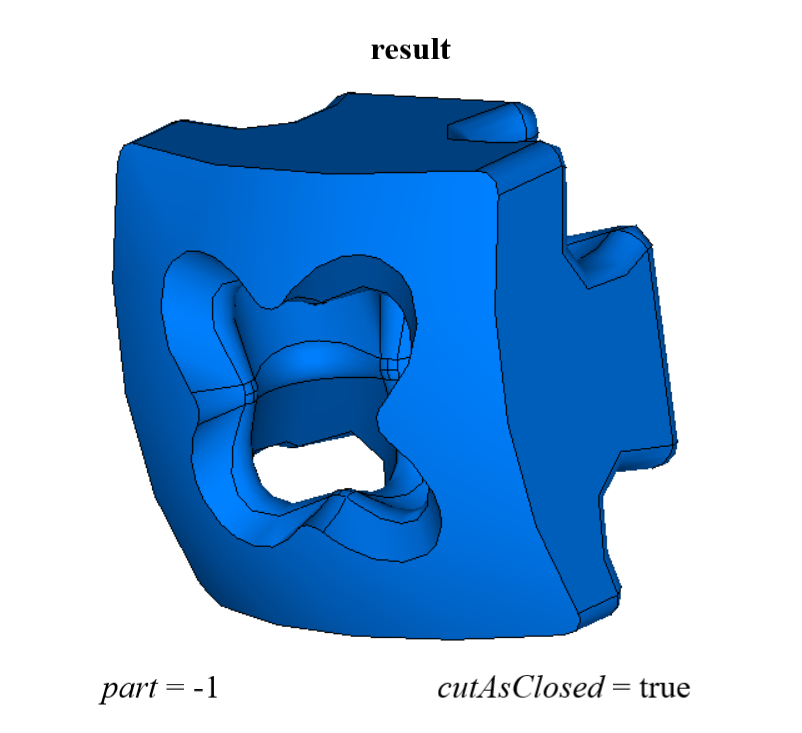
Fig. 13
When part = 0, the function constructs the body result, into which all parts of the original body solid obtained after cutting are included (Fig. 14):
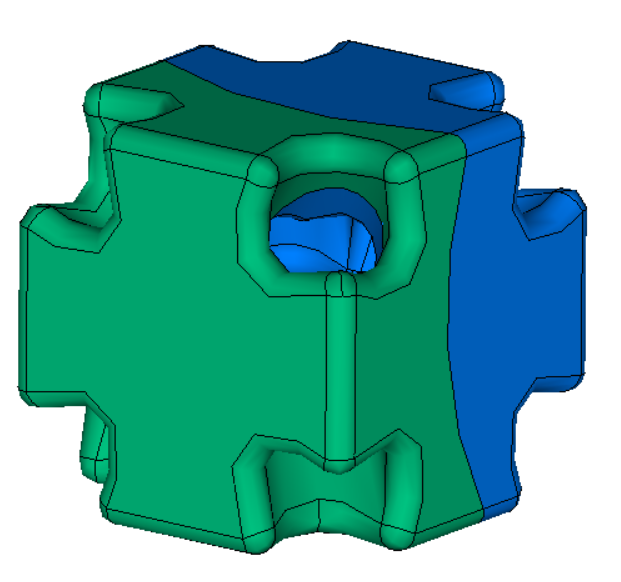
Fig. 14
In the test application test.exe, cutting a body by a shell is performed using the menu commands “Create→Solid→Based on a solid→Cut by a shell” and “Create→Shell→Based on a shell→Cut by a shell”.