The Topology of the MbPolymeshTopo Polygon Object
The MbPolymesh polygon object inherits from MbItem and contains a topology implementation class MbPolymeshTopo (similarly to MbSolid, which contains MbFaceShell inside). The topology includes all methods for working with both the mesh and segmentation. More detailed descriptions of the methods of this class are provided below.
General Purpose Methods
The method
static MbPolymeshTopo * Create();
creates an empty instance of the class.
The method
static MbPolymeshTopo * Create( const MbMesh & mesh,
                                      double   toleranceSew );
creates an instance of the class based on the MbMesh instance. The stitching tolerance toleranceSew is used to merge closely matching vertices into one.
The method
bool GetMesh( MbMesh & mesh ) const;
creates an MbMesh instance, where each subregion corresponds to a separate MbGrid object. The resulting object loses all topological information. The mesh and subregion indices are usually in different orders, and the method adds a mapping between their indices using the MapPolymeshToMbMesh class.
The method
MbPolymeshTopo * Clone() const;
creates a copy of the topology.
The method
void CalculateGabarit( const MbMatrix3D & matrInto,
                             MbCube &     bb ) const;
calculates the bounding box of an object.
The method
void Invert();
inverts the whole topology inside out, including the turning of cycles around facets.
Transformation methods
void Transform( const MbMatrix3D & matr );
void Move     ( const MbVector3D & to   );
void Rotate   ( const MbAxis3D   & axis, double angle );
transform all suitable components of the polygon object (3D points, normals, curvature directions, etc.).
The method
void DeleteInactive();
removes all inactive elements to reduce the size of the polygon object (edges, vertices, mesh facets, segmentation edges, segmentation vertices, segmentation regions, segmentation sub-regions and segmentation cycles).
The method
double FindNearest( const MbCartPoint3D & pnt,
                          MbCartPoint3D & pntProj,
                          size_t &        iFacet ) const;
finds the closest point to the given one and the index of the facet that it hit. Returns the distance from the given point to the nearest one on the polygon object.
The method
bool FindLineIntersection( const MbAxis3D  &     ray,
                                 MbCartPoint3D & pntCross,
                                 double &        tRes,
                                 size_t &        iFacet ) const;
finds the nearest intersection with a straight line. The output parameters are the intersection point, the ray parameter and the index of the facet that this intersection occurred with.
The method
const MbFaceShell * GetSubstrateShell() const;
returns a const pointer to the boundary representation shell used for creating this polygon object, or nullptr if no such shell exists.
The method
void DeleteSubstrateShell();
deletes the corresponding Boundary Representation shell and all mapping information between regions and segmentation edges to faces and edges of the shell.
Methods for Working with the Mesh
The method
const MbHalfedge & GetMeshTopo() const;
returns a mesh topology as an MbHalfedge object. For example, in the module it is used to construct mesh iterators.
The method
void Reserve( size_t nVx,
              size_t nEd,
              size_t nF );
reserves memory for the mesh given size.
The method
size_t CloneVertex( size_t iVx );
clones a mesh vertex and returns the index of the cloned vertex.
Methods for adding mesh elements
size_t AddVertex();
size_t AddEdge();
size_t AddFacet();
add the active mesh element and return its index. If there are inactive elements in the mesh, one of them is switched to the active state and its index is returned.
Methods
void MakeVertexInactive( size_t iVx );
void MakeEdgeInactive   ( size_t iEd );
void MakeFacetInactive  ( size_t iF  );
set the mesh element in an inactive state. Caution! These methods may corrupt the mesh topology.
The method
void SewEdges( size_t iEd0,
               size_t iEd1 );
makes the two specified mesh edges twins.
The method
size_t AddFacet( const c3d::IndicesVector & vertices );
creates a facet by the specified vertices and returns its index. Vertices must already exist before the call. The method sets necessary links between the facet and all the corresponding edges (except for the twins).
The method
void SewByVertices();
sets links to twins for all mesh edges by the vertices where the edges begin. It is used for the final creation of the topology during manual construction, after adding all existing facets with the AddFacet() method.
The method
void DeleteFacets( const c3d::IndicesVector & facets );
deletes the specified facets and ensures the topology validity after the operation. It does not delete inactive elements. The example of the actions required to maintain the topology validity is shown in Fig. 1. In the initial state vertex A is the same for all edges of the fan. After deleting the selected facets, the vertex fan breaks, which is not allowed in the Halfedge structure. So, the vertex will be cloned, and one part of the remaining fan will correspond to vertex A, and the other part to its clone B. At this point, there will be a topological gap of the mesh, but these two vertices are geometrically identical.
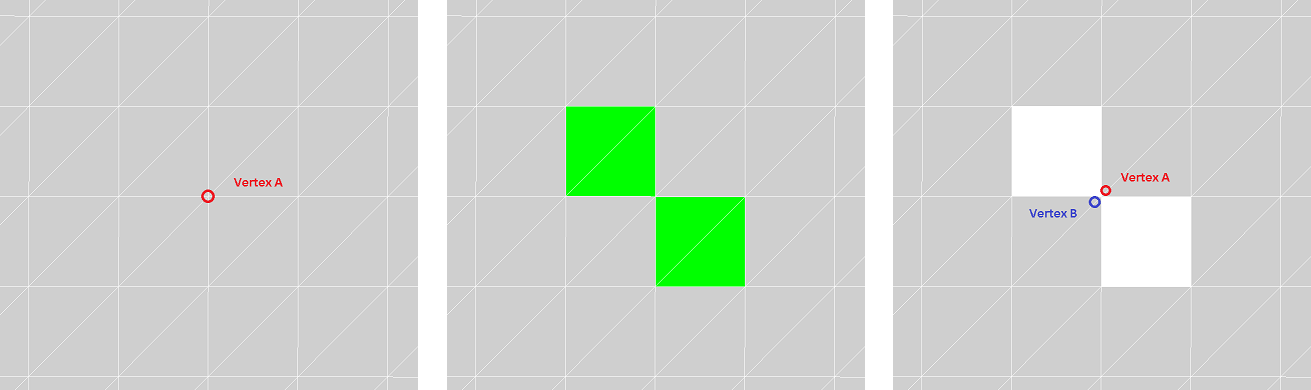
Fig. 1
The method
bool FlipEdge( size_t iEd );
flips an edge in the triangulation. You cannot flip open edges or edges that belong to segmentation edges. The example of working of the method is shown in Fig. 2:
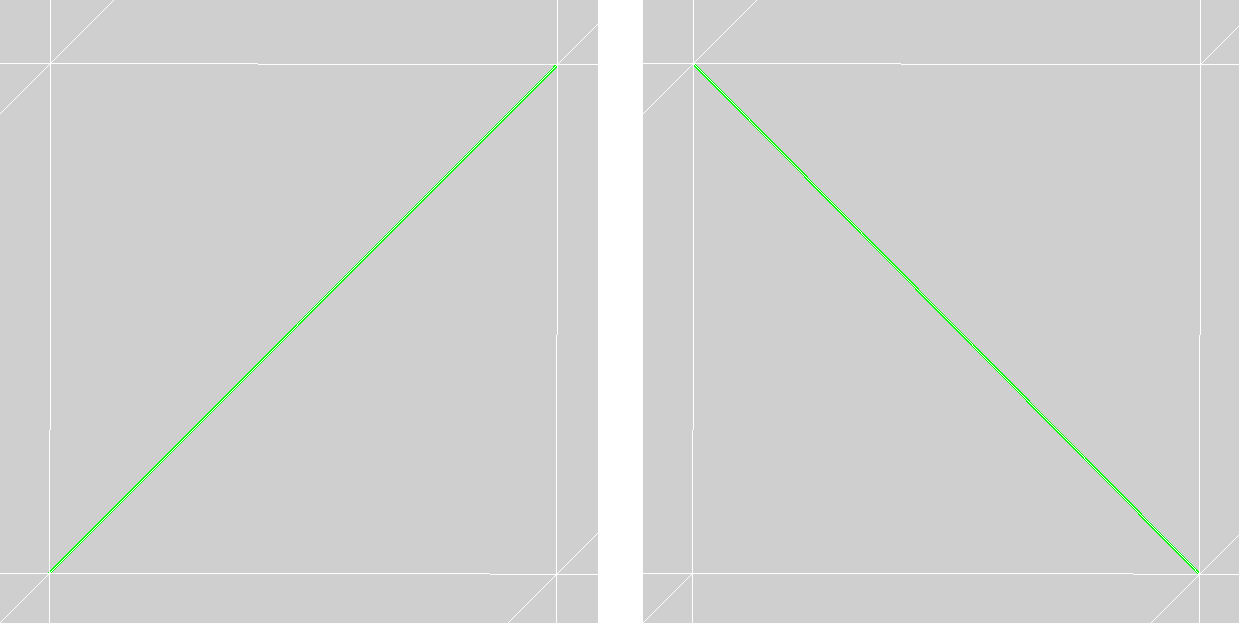
Fig. 2
The method
size_t SplitEdge( size_t iEd,
                  double prm );
splits an edge in the specified parameter that must be in the range from 0 to 1. It returns the index of the bivalent vertex created at this location. The number of edges for adjacent facets will increase by one. Fig. 3 shows the result after triangulating two quadrilateral adjacent facets:
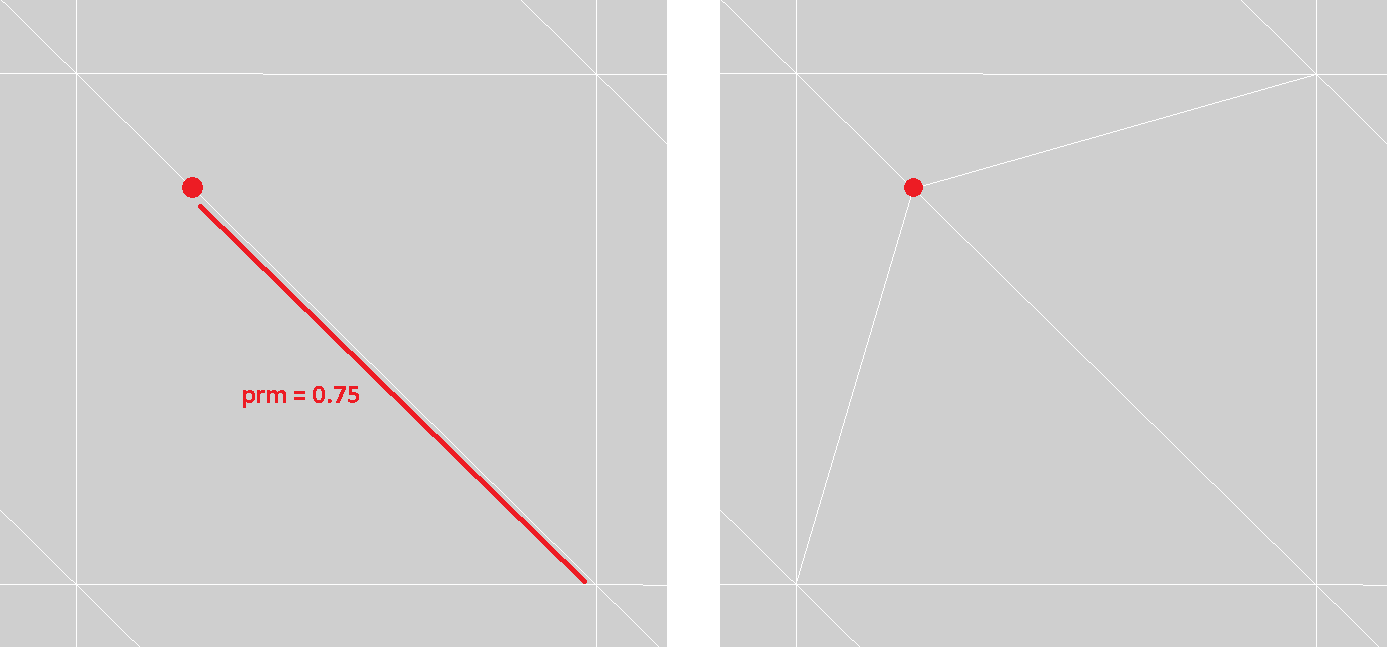
Fig. 3
The method
void SplitFacet( size_t             eVx0,
                 size_t             eVx1,
                 c3d::IndicesPair & eNew );
splits the facet in two by inserting a pair of edges between vertices v0 and v1 that the specified edges eVx0 and eVx1 begin. It returns the indices of these inserted edges. The given edges must belong to the same facet, which will be split. The example is shown in Fig. 4:
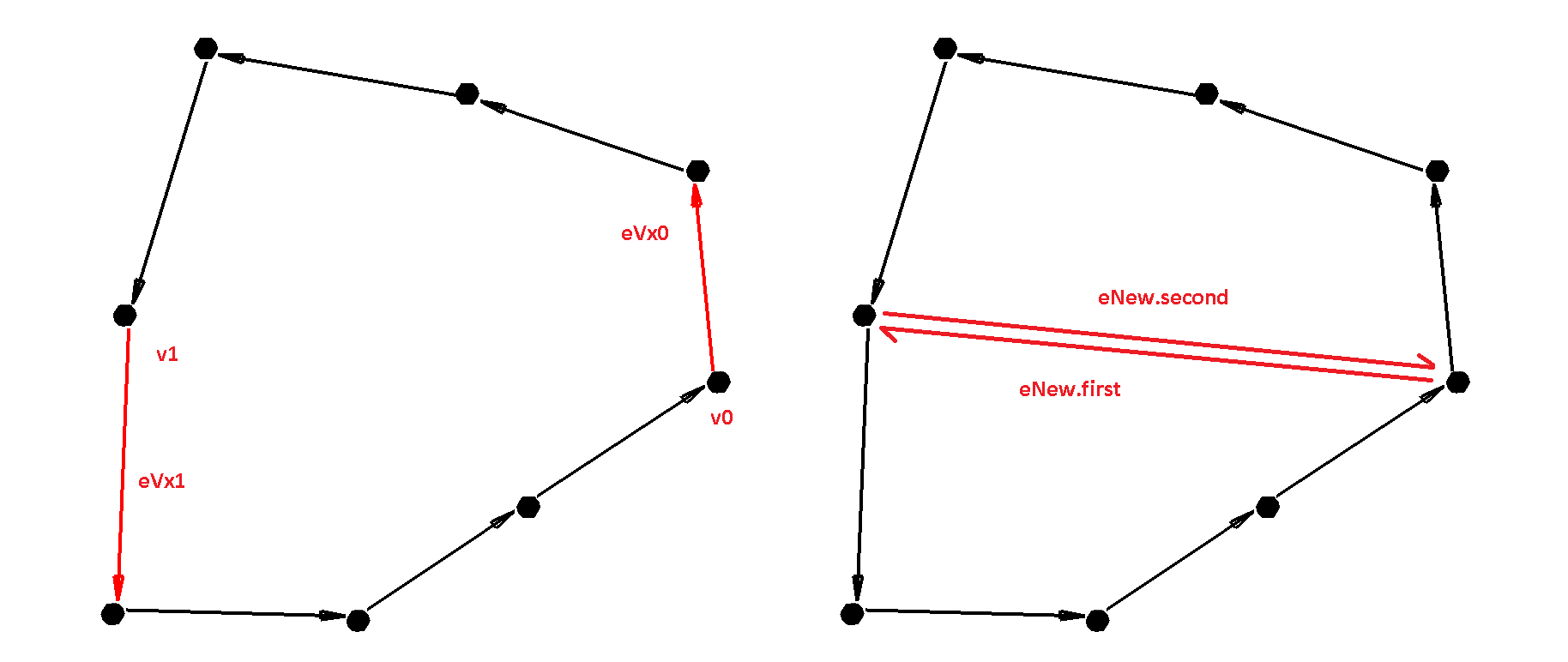
Fig. 4
The method
bool JoinEdgeFacets( size_t iEd );
combines two facets adjacent to an edge into one. This operation is the inverse of the SplitFacet() method. You cannot merge facets if the result is a facet that touches itself by an edge or vertex.
The method
bool RemoveVertexValence2( size_t iVx );
deletes a bivalent vertex of the mesh. This operation is the inverse of the SplitEdge() method.
The method
size_t InsertVertexTriangle( size_t iTr,
                             double u,
                             double v );
inserts a new vertex into the triangle and cuts it into three parts. It returns the index of the inserted vertex. Parameters u and v are barycentric coordinates that define a new vertex inside the triangle. The attribute values for the new vertex (3D point, 2D parameter, normal, curvature, etc.) are computed as a linear combination of the values at the triangle’s vertices according to these barycentric coordinates.
The method
size_t InsertVertexFacet( const c3d::IndicesVector    & edgesSplit,
                          const std::array<size_t, 3> & edgesInterpolate,
                                double                  u,
                                double                  v );
inserts a new vertex into the facet and splits it into several new ones by connecting the edges of the inserted vertex and the vertices where the edges from the edgesSplit array begin. Edges of this array must belong to one facet. The edgesInterpolate array defines a “virtual” triangle of facet vertices, setting the barycentric coordinates u and v.
The example of using the method is shown in Fig. 5. Fig. a) shows the black facet to split by the blue vertex and the purple edges. Fig. b) shows green facet edges, whose indices should be specified in the edgesSplit array (they should be arranged in order within the facet). Fig. c) shows a “virtual” triangle in green setting barycentric coordinates, and in red — the indices of edges to be placed in the edgesInterpolate array. The calculation of attribute values for a new vertex is similar to the InsertVertexTriangle() method.
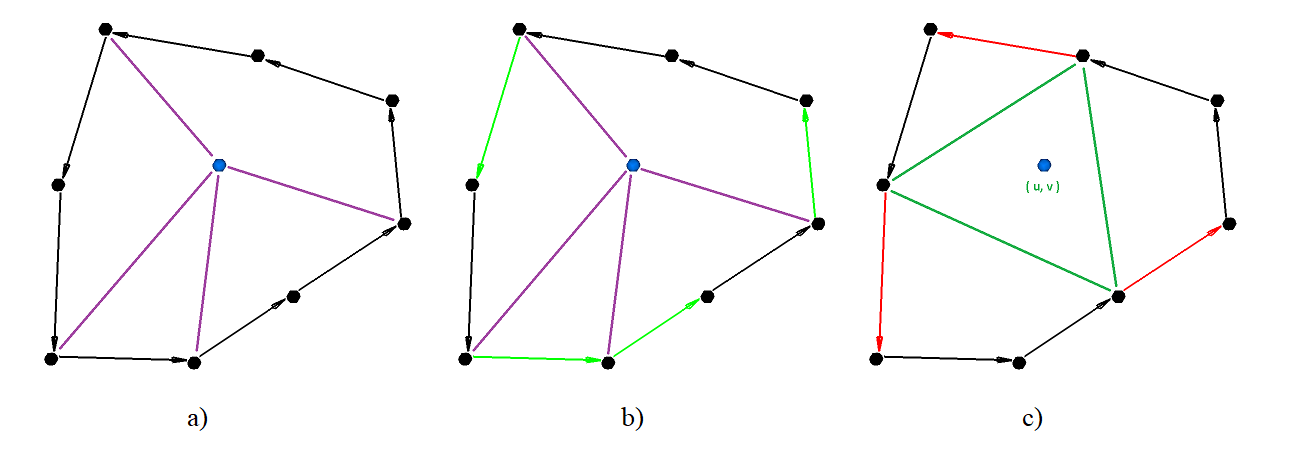
Fig. 5
Methods for Working with Segmentation
The method
bool IsSegmented() const;
checks a segmentation initiation. It is recommended to always initialize segmentation.
The method
void Initialize( const MbHalfedgeBoundaryCriterionBase & crit );
initializes segmentation according to the specified boundary criterion. The criterion should be implemented by a user as an inheritor of the MbHalfedgeBoundaryCriterionBase base class, which defines whether a mesh edge is a dividing line or not. For example, you can pre-calculate dihedral angles for mesh edges and create a criterion that checks if the angle exceeds a specified threshold or not. This produces a mesh segmentation by sharp boundaries.
The method
void Initialize();
initializes the segmentation with a single region. Each connected part of the mesh is assigned to its own subregion. Segmentation edges are formed from open mesh edges if any exist. It is recommended to always initialize segmentation in this way when manually creating a polygon object.
The method
const MbHalfedge & GetSegmTopo() const;
provides access to a constant segmentation topology as the Halfedge. It is used for constructing some segmentation iterators.
The method
size_t LoopsCount() const;
returns the number of cycles in the segmentation (including inactive ones).
The method
const MbSegmentationLoop & Loop( size_t iLoop ) const;
returns a segmentation cycle by its index.
The method
size_t RegionCount() const;
returns the number of regions in the segmentation (including inactive ones).
The method
bool IsRegionActive( size_t iRegion ) const;
checks if the region is active. The same operation can be done using the IsFacetActive() method with the same index for the segmentation topology returned by the GetSegmTopo() method.
The method
size_t SubRegionsCount() const;
returns the number of subregions in the segmentation (including inactive ones).
The method
size_t SubRegionsCount( size_t iRegion ) const;
returns the number of subregions included in the specified region.
The method
const MbSegmentationSubRegion & SubRegion( size_t iSub ) const;
returns a segmentation sub-region by its index.
The method
size_t EdgeSegmCount() const;
returns the number of edges in the segmentation (including inactive ones).
The method
const MbHalfedgeEdge & EdgeSegm( size_t iEdSegm ) const;
returns a segmentation edge by its index.
The method
bool IsInnerEdge( size_t iEdSegm ) const;
checks if the segmentation edge is internal.
The method
size_t GetSegmEdgeId( size_t iEdTopo ) const;
returns the index of the segmentation edge including the specified mesh edge.
The method
void GetFacetRegionId( size_t   iFacet,
                       size_t & iRegion,
                       size_t & iSubRegion ) const;
returns the indices of the region and subregion including the specified mesh facet.
The method
size_t VertexSegmCount() const;
returns the number of vertices in the segmentation (including inactive ones).
The method
const MbHalfedgeVertex & VertexSegm( size_t iVxSegm ) const;
returns a segmentation vertex by its index.
The method
void GetRegion( size_t              r,
                c3d::IndicesVector & facets ) const;
returns indices of all mesh facets included in the specified region.
The method
void GetSubRegion( size_t              iSub,
                   c3d::IndicesVector & facets,
                   bool                bAdd = false ) const;
returns indices of all mesh facets included in the specified sub-region.
The method
void DeleteRegion( size_t iRegion );
deletes the specified region. The topology validity of the mesh and segmentation is maintained similarly to deleting facets.
The method
void SplitByEdgesTopo( const c3d::IndicesVector & splitSet,
                             bool                 bKeepRegions );
splits the existing segmentation by a set of mesh edges. This operation may create new connected facet groups. A new subregion is created for each of them. If the bKeepRegions flag is true, the new subregions remain within their original region; otherwise, a new region is created for each subregion. This operation can also create internal segmentation edges.
The method
void MergeRegions( const c3d::IndicesVector & regions,
                         bool                 bRemoveValence2 );
merges the specified regions into one. Its index is equal to the first index of the regions array. In this case, sequences of segmentation edges separated by bivalent segmentation vertices can be formed. By the bRemoveValence2 flag these sequences are combined into segmentation edges.
The method
void SplitByFacetsTopo( const c3d::IndicesVector & splitSet,
                        bool                       bMakeOneRegion,
                        bool                       bKeepRegions );
splits the existing segmentation by a set of mesh facets. This set corresponds to one or more connected facet groups from old regions, each of which is assigned a new sub-region. Adding the groups to new regions and subregions depends on the two control flags bMakeOneRegion and bKeepRegions. The example is shown in Fig. 6 — the segmentation consists of four simple regions to be split by facets highlighted in bright green:
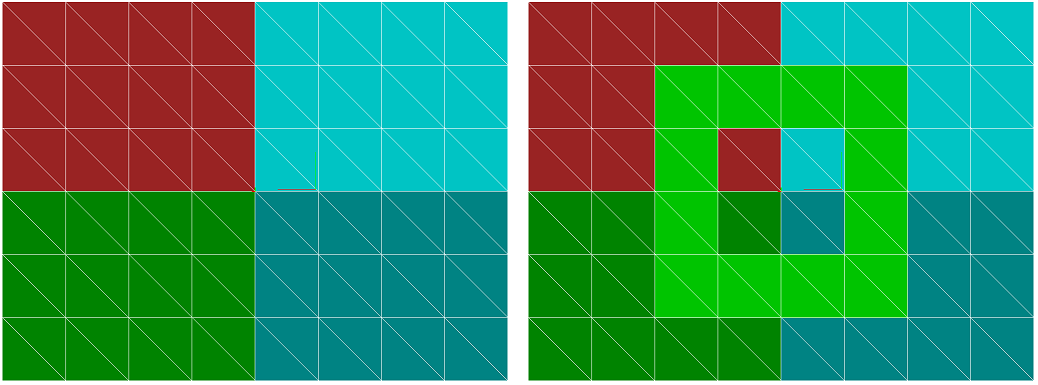
Fig. 6
One color shows facets that belong to one region.
bMakeOneRegion = true, bKeepRegions = true.
The selected facets formed one new region (highlighted in yellow). The old regions remained, but were divided into two subregions each. In total, there are now 5 regions in the segmentation (see Fig. 7).
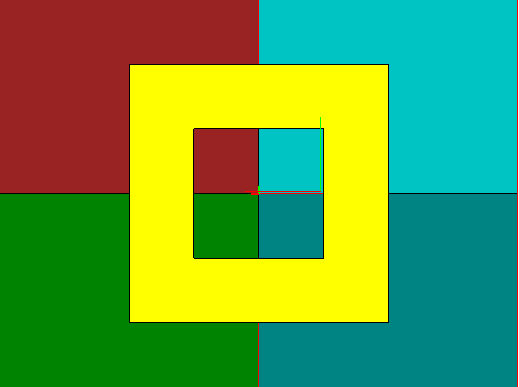
Fig. 7
bMakeOneRegion = true, bKeepRegions = false.
The selected facets formed one new region (yellow). Each of the old regions splits into two unrelated parts, each forming a new separate region. There are 9 regions in the segmentation now (see Fig. 8):
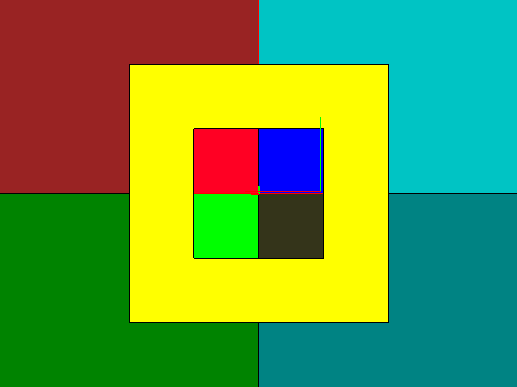
Fig. 8
bMakeOneRegion = false, bKeepRegions = true.
The selected facets split each of the old regions into 3 parts. There are still 4 regions in the segmentation, but each of them now consists of three subregions (see Fig. 9).
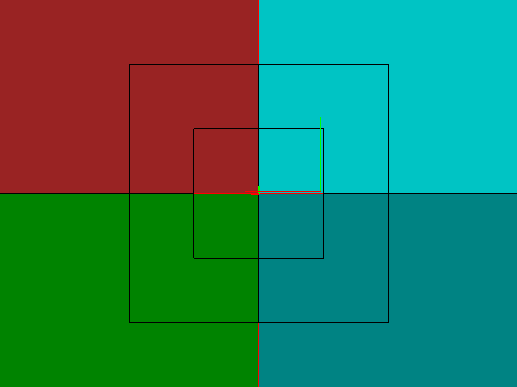
Fig. 9
bMakeOneRegion = false, bKeepRegions = false.
The selected facets split each of the old regions into 3 parts. Each such part is assigned a new region. In total, there are now 12 regions in the segmentation, each consisting of one subregion (see Fig. 10):
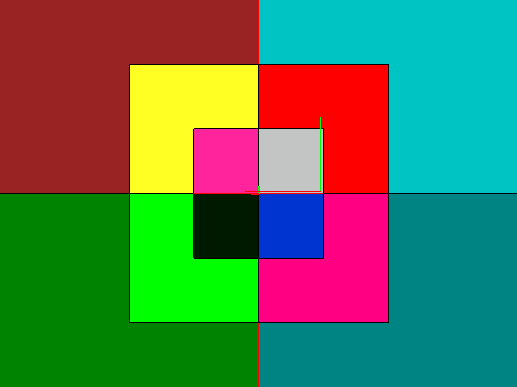
Fig. 10
The method
void SplitRegionBySubregions( size_t iReg );
separates subregions of the given region as new independent regions.
The method
c3d::IndicesPair SplitSegmentationEdge( size_t iEdSegm,
                                        size_t iEdTopo,
                                        size_t iVxSegmSplit = SYS_MAX_T );
cuts the segmentation edge with index iEdSegm (and its twin) at the origin vertex of the iEdTopo edge. The iEdTopo edge must belong to the segmentation edge and not be the first mesh edge for the segmentation edge. If the iVxSegmSplit index is defined, it will be assigned to the created bivalent segmentation vertex. It returns indices of new segmentation edges formed from the old segmentation edge and its twin (if it exists). The method does not change the mesh topology. New segmentation edges inherit attributes of old edges.
The method
bool ExtractSubRegionAsRegion( size_t iSub );
creates a new region containing the given subregion. If the old region consisted only of the specified subregion, no actions will be performed.
The method
void RemoveSegmVertexValence2( size_t iVx );
deletes a segmentation bivalent vertex. The inverse method to SplitSegmentationEdge().
The method
size_t GetTopoVertex( size_t iVxSegm ) const;
returns the index of the mesh vertex where the given segmentation vertex is located.
The method
size_t GetSegmEdgeRegionId( size_t iEdSegm ) const;
returns the index of the region including the segmentation edge.
The method
size_t GetSegmEdgeSubRegionId( size_t iEdSegm ) const;
returns the index of the subregion including the segmentation edge.
The method
size_t GetLoopRegionId( size_t iLoop ) const;
returns the index of the region including the cycle.
The method
size_t GetLoopSubRegionId( size_t iLoop ) const;
returns the index of the sub-region including the cycle.
The method
size_t GetNeighborRegionId( size_t iEdSegm ) const;
returns the index of the region opposite to the given segmentation edge.
The method
size_t GetNeighborSubRegionId( size_t iEdSegm ) const;
returns the index of the subregion opposite to the given segmentation edge.
Methods for Working With Mesh and Segmentation Attributes
The method
size_t MeshHalfedgeAttributeCount() const;
returns the total number of mesh attributes.
The method
size_t SegmHalfedgeAttributeCount() const;
returns the total number of segmentation attributes.
The method
template <class T>
T * AddMeshHalfedgeAttribute();
creates a mesh attribute of the specified type and returns a pointer to it.
The method
template <class T>
T * AddSegmHalfedgeAttribute();
creates a segmentation attribute of the specified type and returns a pointer to it.
The method
template <class T>
T * GetMeshHalfedgeAttribute();
template <class T>
const T * GetMeshHalfedgeAttribute() const;
returns a pointer to the first mesh attribute of the specified type. If multiple attributes exist, only the first one is returned.
The methods
template <class T>
T * GetSegmHalfedgeAttribute();

template <class T>
const T * GetSegmHalfedgeAttribute() const;
returns a pointer to the first segmentation attribute of the specified type. If multiple attributes exist, only the first one is returned.
The method
template <class T>
void DeleteMeshHalfedgeAttribute();
deletes a mesh attribute of the specified type. If the object has more than one attribute with this type, the method deletes the first one.
The method
template <class T>
void DeleteSegmHalfedgeAttribute();
deletes a segmentation attribute of the specified type. If the object has more than one attribute with this type, the method deletes the first one.
The methods
MbHalfedgeAttrBase * GetMeshHalfedgeAttributeByIndex( size_t ind );

const MbHalfedgeAttrBase * GetMeshHalfedgeAttributeByIndex( size_t ind ) const;
returns a pointer to a mesh attribute with the specified index in the attribute array.
The methods
MbHalfedgeAttrBase * GetSegmHalfedgeAttributeByIndex( size_t ind );

const MbHalfedgeAttrBase * GetSegmHalfedgeAttributeByIndex( size_t ind ) const;
returns a pointer to a segmentation attribute with the specified index in the attribute array.
The method
void DeleteMeshHalfedgeAttribute( MbHalfedgeAttrBase * pAttr );
deletes the given mesh attribute.
The method
void DeleteSegmHalfedgeAttribute( MbHalfedgeAttrBase * pAttr );
deletes the given segmentation attribute.
The method
MbAttributeContainer * GetSegmRegionModelAttributes( size_t iRegion,
                                                     bool   bCreate );
returns the attribute container of a geometric core object for the region. If it is missing, by the bCreate flag it is created, otherwise a nullptr is returned.
The method
const MbAttributeContainer * GetSegmRegionModelAttributes( size_t iRegion ) const;
returns the attribute container of a geometric core object for the region, or nullptr if it does not exist.
The method
MbAttributeContainer * GetSegmEdgeModelAttributes( size_t iEdSegm,
                                                   bool   bCreate );
returns the attribute container of a geometric core object for a segmentation edge. If it is missing, the bCreate flag is used to create it, otherwise a nullptr is returned.
The method
const MbAttributeContainer * GetSegmEdgeModelAttributes( size_t iEdSegm ) const;
returns the attribute container of a geometric core object for a segmentation edge, or nullptr if it does not exist.
The method
MbAttributeContainer * GetSegmVertexModelAttributes( size_t iVxSegm,
                                                     bool   bCreate );
returns the attribute container of a geometric core object for a segmentation vertex. If it is missing, the bCreate flag is used to create it, otherwise a null pointer is returned.
The method
const MbAttributeContainer * GetSegmVertexModelAttributes( size_t iVxSegm ) const;
returns the attribute container of a geometric core object for a segmentation vertex, or nullptr if it does not exist.