The C3D geometric kernel has already supported the creation of midsurfaces located at equal distance from the face groups. We have expanded this functionality to cover the general case. Now you can construct spline-based midsurfaces between groups of smoothly connected faces, while the distance to these faces may vary.
Examples
Below are some examples of general midsurfaces. The midsurfaces are blue, and the offset surfaces are green and orange.

Figure 1, a. A spline-based midsurface

Figure 1, b. A midsurface between the groups of surfaces. Top: 3D view. Bottom: Cross-section

Figure 1, c. A closed midsurface
A Common Approach
A spline-based midsurface is generated as follows.
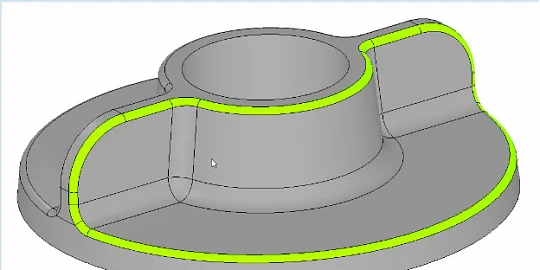
First, the user selects the reference and opposite surfaces. They may include multiple faces of the same body. The curvature continuity of these surfaces should be at least G1. The user also specifies where to create the midsurface. To achieve this, the normals of the base and opposite surfaces must be oriented so that the two surfaces enclose the future midsurface. In Figure 2, the reference surface is green, and the opposite surface is orange.

Figure 2. Reference and opposite surfaces
Step one: a mesh is built on the reference set of faces.

Figure 3. Mesh on the reference surface
Step two: Each mesh node is mapped to a point on the midsurface. The procedure builds spheres that touch both the reference surface at the mesh nodes and the opposite surface. The centers of such spheres form a point cloud shown in Figure 4.

Figure 4. Midsurface points
Step three: the points are filtered by several criteria. Some of these criteria validate the points and remove invalid ones. Other criteria are user-defined. For example, you can remove points that are centers of spheres touching not the opposite surface itself but its extension. Figure 5 shows this filter criterion.

Figure 5. Filtering the midsurface points. The green points match the criterion as their spheres touch the opposite surface itself, not its extension
Now the reference surface mesh is mapped onto the midsurface points. The result is the rough mesh representation of the midsurface.

Figure 6. Midsurface mesh
The final step is adaptive approximation of the mesh with a spline-based surface. The resulting surface is the midsurface we need.

Figure 7. Spline-based midsurface
Changes to the API
The API has been modified to support general midsurfaces. We’ve introduced MbMedianShellParams, a new constructor that takes two sets of indices representing the faces of the reference and opposite surfaces. MbMedianShellParams is derived from MbPrecision. MedianShellValues now has new arguments listed below.
- Start mode: InputMode::im_twogroups.
- The groupsInvNormals flags to invert the normals of the reference and opposite surfaces. Use the flags to specify where to create the midsurface (between the inner sides of the reference and opposite surfaces).
- The respGroupExt flag includes the midsurface points generated from the extension of the opposite surface.
For more information about the API updates please visit.
Below is a code that creates a spline-based midsurface.
// 1. Select the body.
SolidSPtr baseSolid( ::SelectSolid() );
// 2. Create the operation arguments.
MbSNameMaker snameMaker( (SimpleName)ct_MedianShell, MbSNameMaker::i_SideNone, 0 );
IndicesSet baseFaces, respFaces; // Sets of faces that make up the reference and opposite surfaces.
baseFaces.insert( baseSolid->GetFaceIndex( *::SelectFace() ) );
respFaces.insert( baseSolid->GetFaceIndex( *::SelectFace() ) );
MedianShellValues params;
params.inputMode = MedianShellValues::InputMode::im_twogroups;
params.detectPairs = false; // Try to find face pairs and generate an equidistant midsurface.
// Flags to invert the normals of the reference and opposite surfaces.
params.groupsInvNormals = { false, false };
// Selecting the midsurface envelope.
params.respGroupExt = true; // Include the extension of the opposite surface?
params.cutByBordes = false; // Trim the midsurface with the body envelope?
MbMedianShellParams opParams( baseFaces, respFaces, params, snameMaker );
opParams.SetPrecision( 1.0E-6 ); // Precision.
MbMedianShellResults results; // Results.
// 3. Creating the midsurface.
MbResultType res = ::MedianShell( *baseSolid, cm_Copy, opParams, results );
// 4. Rendering
if ( results._solid != nullptr ) {
TestVariables::viewManager->AddObject( Style(), results._solid );
// Deviation between the spline and the initial mesh representation of the midsurface.
double deviation = results.GetTolerance();
}

Ilya Patrushev
Lead Mathematician-Programmer, Ph.D.
C3D Labs