Tatiana Mitina, Head of the C3D Labs Nizhny Novgorod Office, explains how multithreading is organized in the C3D kernel, what thread safety measures are in place, and which parallel computations the kernel performs internally. Special attention is given to the rules for using the C3D kernel in multithreaded environments.
Multithreading is something like parallel universes!
To eliminate any ambiguity, let’s clarify the terminology. Thread safety means data can be safely used in multiple threads. Multithreading is the ability of code to perform calculations in multiple threads while ensuring thread safety.

Fig. 1. Multithreading: synchronization challenges
Now, about multithreading.
It sometimes raises concerns. There’s a good reason why one of the Rust programming language manuals online titles its multithreading section “Multithreading Without Fear.” The words “multithreading” and “danger” often go hand in hand, likely because poorly organized multithreading can lead to serious issues in the code, primarily related to synchronization, such as data races, deadlocks, and the like. These issues often result in dramatic failures such as application crashes or freezes. Even if you manage to avoid such difficulties, getting incorrect results is quite likely.
To avoid such problems, a mechanism is needed to give each thread exclusive (preferably lock-free) access to the data it uses. The C3D geometric kernel provides exactly such a mechanism, enabling seamless use of its interfaces across multiple threads.
Let’s look into the details of the kernel multithreading features that ensure thread safety, support kernel multithreading modes, and multithreaded caches. We will also cover the available synchronization objects and locks (which we try to minimize), as well as the parallel computations performed by the kernel itself.
Kernel Multithreading Modes
A C3D kernel multithreading mode defines the overall multithreading configuration as follows:
- - Whether the kernel is configured to use its thread safety mechanism
- - The extent to which computations within the kernel are parallelized.
All the kernel modes are divided into two groups: non-thread-safe and thread-safe.

Fig. 2. C3D multithreading modes
The first group includes the modes when the kernel can be used in only one thread.
Off mode means the kernel runs entirely in a single thread. All multithreading mechanisms are disabled, and no parallelism is supported. The kernel can successfully operate in one thread, but you cannot use the kernel in multiple threads in this mode.
In the Standard mode, you cannot use the kernel in multiple threads, either. Standard mode differs from Off mode in that the kernel performs limited parallel computations: completely independent data is processed in separate threads.
The second group includes kernel thread-safe modes.
SaveItems mode activates the kernel’s thread-safety mechanisms, allowing it to run in multiple threads, while only a limited set of computations is parallelized within the kernel.
Items mode is also thread-safe. In this mode, the kernel parallelizes all computations wherever possible.
Max mode is currently identical to Items mode; it is reserved for future enhancements.

Fig. 3. Multithreaded Caches
Kernel Thread Safety Mechanisms
Let’s talk about the most important mechanism that makes the kernel thread-safe. It is called ’multithreaded caches’.
The C3D kernel makes extensive use of caching. Data computed from input parameters is stored in the cache under the assumption that the same parameters might be passed to the kernel again, eliminating the need to recompute the results.
Data caching is a well-known computational efficiency booster. It works fine in a single thread. In a multithreaded environment, threads compete for access to the cache. Therefore, we have created a multi-threaded cache. It provides each thread with a dedicated cache, ensuring exclusive, lock-free access to the data processed by that thread.
Note that the multithreaded cache is disabled by default. Activate it before using the kernel in multiple threads, and deactivate afterwards. Why is it done this way?
First, if the kernel is used in just one thread, using the multithreaded cache does not make sense, as it takes some computational resources, however small. Using the kernel in a single thread would be more efficient when the multithreaded cache is disabled.
Also note that multithreading accumulates caches that become invalid when a thread terminates. Therefore, the multithreaded cache must regularly synchronize data and perform garbage collection, which is only possible when no multithreading is running and the multithreaded cache is disabled.
The following rule follows from the above: If the C3D kernel is running in a single thread, no action is required. However, a notification must be sent to the kernel before running it in multiple threads. This notification enables the multithreaded cache feature, the kernel becomes thread-safe, and it can be used in multiple threads. After all threads have completed their operations with the kernel, another notification must be sent to indicate that multithreading is finished.
The ’EnterParallelRegion’ and ’ExitParallelRegion’ function pair provides the interface for notifying the kernel about the start and end of multithreading. Instead, you can also use a pair of macros that take an additional input parameter indicating whether actual parallelization will occur. Notifications are sent to the kernel only if this parameter is true. Besides the functions or macros, you can use the ’ParallelRegionGuard’ class, which sends notifications to the kernel within the scope of the class instance.
Mini Summary
Let’s summarize what we have discussed.
The C3D kernel’s ability to run in multiple modes can be enabled or disabled. The multithreading mode controls the extent of parallelization in the kernel.
To use the kernel in multiple threads, you must activate the multithreaded caches and deactivate them when switching back to a single-threaded setup. There are dedicated API calls for this purpose.
The kernel also provides its synchronization objects, which can be used to provide exclusive access to some data if needed.
The C3D kernel makes extensive use of multithreaded computations in such procedures as generation of plane projections, calculation of mass properties, triangulations, operations with shells, surfaces, and curves, converters, etc. The kernel also supports multithreading for C3D data read and write operations.

Fig. 4. Multithreading C3D operations
How to Use the C3D Kernel in Multiple Threads
So, how to use the C3D kernel in multiple threads? First, check the kernel’s multithreading mode.
Note that the kernel provides an interface to change the multithreading mode. In this way, you can configure the kernel in some special cases. Here is an example. The kernel parallelizes its calculations using OpenMP. If the client code also uses OpenMP, the kernel’s internal parallelization may affect the efficiency of parallelism in the client code. Since OpenMP is used in both cases, you may try to improve the performance. For example, you can activate nested parallelism or, on the contrary, limit parallelization in the kernel by selecting the SaveItems kernel mode when the kernel remains thread-safe but its internal parallelization is limited.
However, such a situation is quite rare. In most cases, you don’t need to change the kernel’s default maximum multithreading mode. It is the default mode in which the kernel is best used.
In the kernel’s thread-safe mode, you can run its operations in multiple threads provided that:
- The threads process completely independent data.
- Or the operations invoked in the threads do not modify any of the shared data.
In the first case (completely independent data), there are no restrictions.
The second case is more interesting. Suppose two threads perform operations on the same body. What operations can be run in this case? You can request some information about the body, calculate its metrics, check the geometry, and run other operations that do not modify the body. For thread safety, the body must not be rebuilt, i.e., it must remain unchanged in all threads.
Let’s consider some examples of calling kernel operations in multiple threads.

Fig. 5. Example 1
The dimensions of the shell faces are calculated in the loop.
First, we check the kernel’s multithreading mode by initializing a variable that will control multithreading. The multithreading is organized using the OpenMP pragma. It will parallelize the specified loop if the control variable is true. Since it is conditional parallelization (variable-controlled), we use macros that take this variable as input to notify the kernel. Before the loop, we notify the kernel that multithreading [may] begin, and after the loop, we notify the kernel that multithreading is over.

Fig. 6. Example 2
In Example 2, the threads that will use the kernel are launched in a loop. The kernel is notified using an instance of the ParallelRegionGuard class. The constructor sends a notification to the kernel about the start of multithreading. The destructor sends a notification about the end of multithreading.

Fig. 7. Example 3
Example 3 is a bit more complicated. First, we use the kernel in one thread, so no kernel notifications are required. Before starting a new thread, we need to notify the kernel that we are starting to use it in multiple threads. After both threads have finished, we notify the kernel that the multithreading is complete.
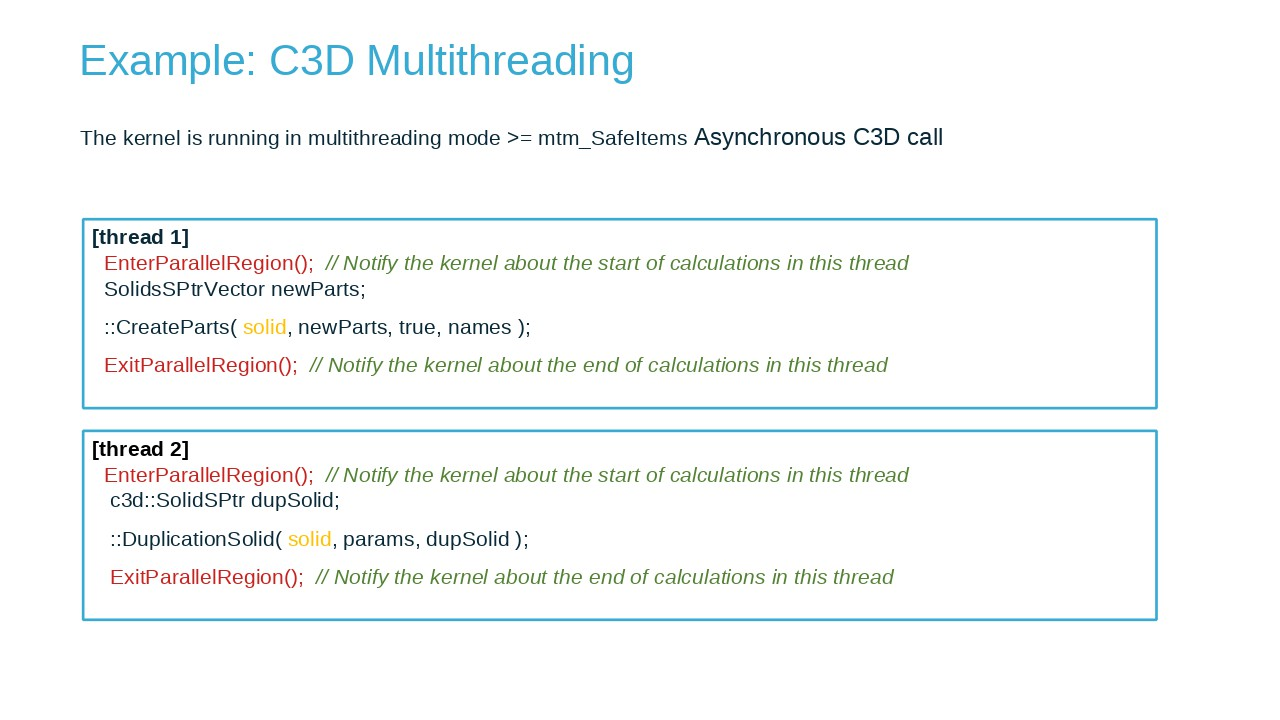
Fig. 8. Example 4
Example 4 is an asynchronous call of kernel interfaces in multiple threads. Suppose there are two permanently running threads that call kernel functions from time to time.
To make the kernel thread-safe at the right moment, we can arrange the code as follows. In each thread, before calling a kernel operation, we notify the kernel using the EnterParallelRegion function. After the operation is completed, we call ExitParallelRegion. Such actions are performed in each thread for each kernel call.
In this way, the kernel is always ready to work in multithreaded mode.
Please note that we do not recommend just adding EnterParallelRegion at the beginning and ExitParallelRegion at the end of the main() function because the kernel needs to synchronize caches from time to time and run garbage collection, which is possible only when multithreaded caches are disabled. Otherwise, the caches would accumulate and may become invalid as they cannot be synchronized.
Summary
Multithreading with the C3D kernel is no big deal!
The C3D kernel supports multithreading, provides interfaces for its safe use in multithreaded applications, extensively uses parallel computations, and, finally, can be configured to match the multithreading structure of the client application.
By following simple rules, you can safely use the kernel in multiple threads to make your product more productive.

Tatiana Mitina
Head of the C3D Labs Nizhny Novgorod Office