Oleg Kirillov, Senior Product Owner, Process Modeling and Optimization, SIBUR Digital, talks about their experience with C3D Labs solutions.
Since 2023, SIBUR Digital has been using C3D Labs products. One of them is the C3D Web Vision web framework, integrated into SIBUR’s engineering data management web application. Thanks to efficient collaboration between the SIBUR and C3D Labs teams, the integration has expanded far beyond this first solution. Joint efforts on requirements management and business analytics have led to a number of technical improvements and new functionality.
One of the key areas is the C3D Web Vision 2.0 framework performance enhancement. We focus on engineering data handling, and primarily on efficient handling of large and often irregular 3D models.

Fig. 1. Handling engineering data
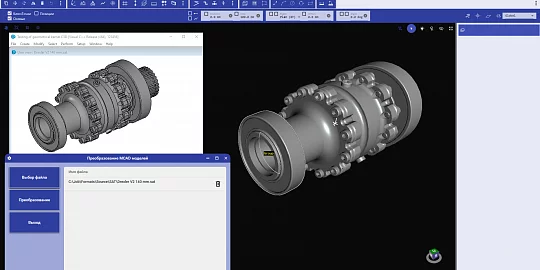
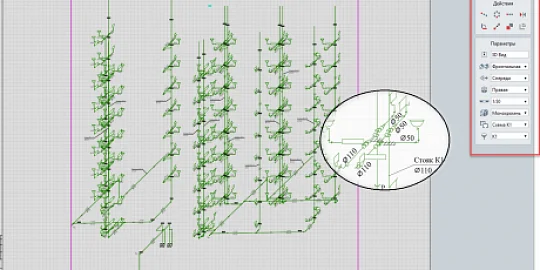
The engineering data management framework has a wide range of applications (fig. 1). The Production Dept. employees use it to visually locate components of a facility and to search for equipment by its tag number. The model viewer, API object search and select functions, and model structure tree view facilitate this.
The designers use the C3D measurement module to get distances, radii, and cross-sections. The Construction Dept. uses the viewer to compare 2D drawings and 3D models.
Large models are still one of the key issues. Dividing models into regions is not a solution. On the contrary, it interferes with collision detection and precise measurements at the region joints. Moreover, breaks in pipelines, cables, and other structures make subsequent analysis impossible. Also, you cannot visualize the equipment in the context of the entire model, making it difficult to understand the equipment’s functionality and connections. Switching between files is time-consuming and leads to a loss of current context.
The optimization of the C3D Web Vision 2.0 module aims to solve these issues and provide stable handling of large models, better performance, and an improved user experience.
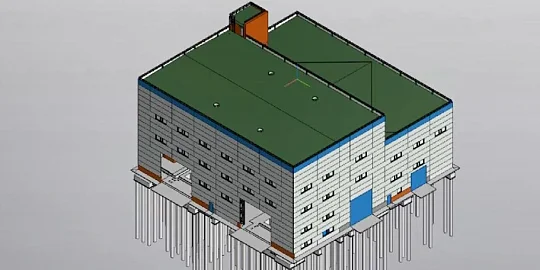
Fig. 2. Model of an 800 MW combined cycle power plant (Sevzapenergomontazh Trust, ZAO)
Large industrial facilities, such as oil refineries and gas processing plants, are complicated, interconnected systems (fig. 2). We need a comprehensive model to assess the facility layout, access routes, and interfaces between the engineering disciplines: process, I&C, electrical, construction, and utilities.
We analyzed the business context and developed requirements for the system: key functions, metrics, and constraints. Our priority was to open C3D models up to 20 GB in size. Important metrics that had to be met were:
- Time-to-First-Pixel (TTFP): the time required to display the first graphics should not exceed 10 seconds after the file is opened
- FPS (frames per second): for models with up to 10 million objects, the frame rate should be at least 30.
Other tasks included adding priorities to geometry elements (objects closer to the camera are loaded first) and introducing all tools required for the workflow (object selection, measurement, and cross-section generation).
It was challenging because we had to meet the constraints of the client's rendering system architecture. The minimum specs were an Intel i5 CPU, 8 GB of RAM, and an integrated graphics card with 1 GB of video memory. Another constraint was that Chromium-based browsers can access only 4 GB of memory.
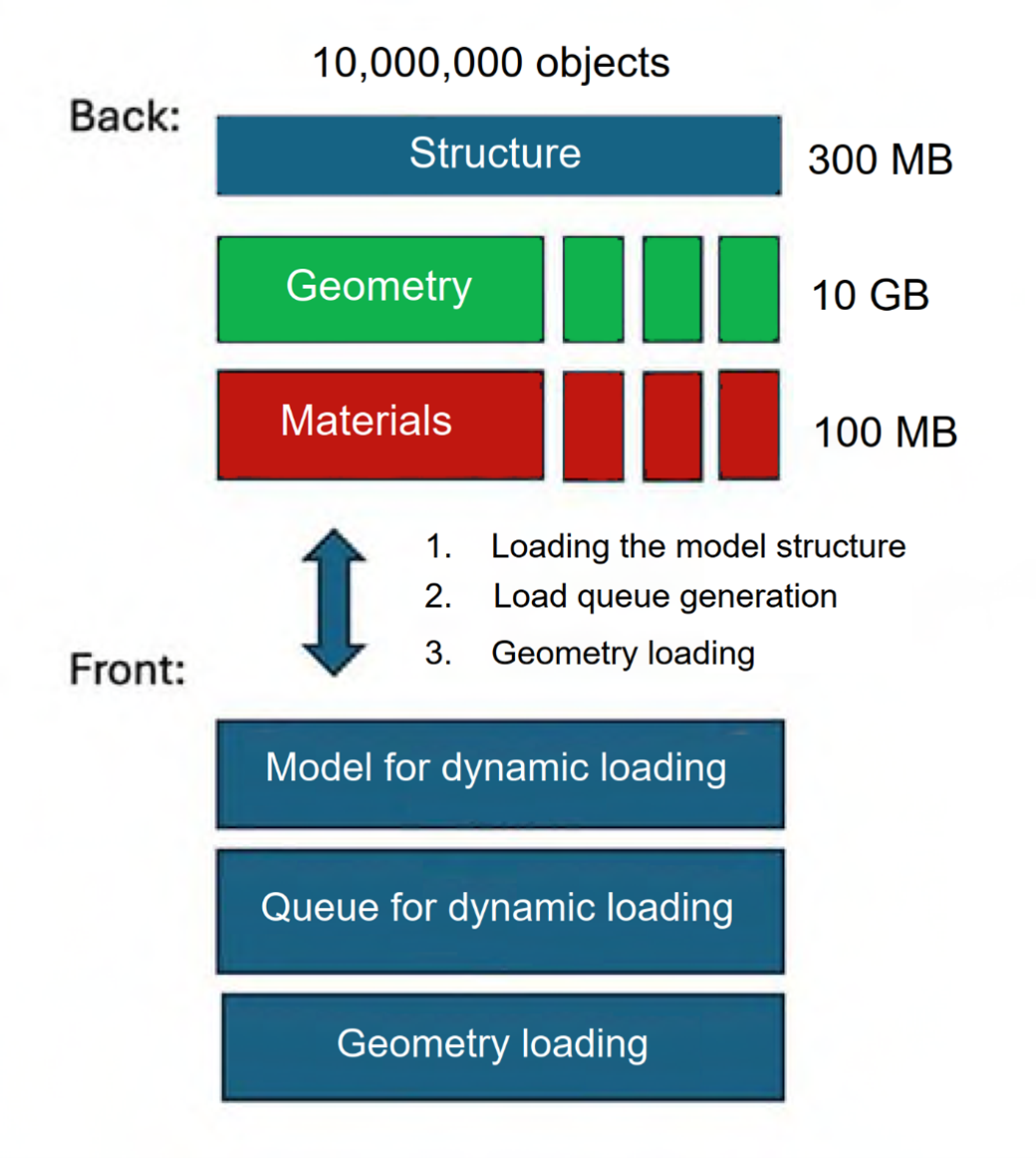
Fig. 3. Initial large model loading procedure (C3D Web Vision 1.x)
In C3D Web Vision 1.x, the model structure was represented as a single entity, which could be as large as 300 MB. The model loading process consisted of three stages (Fig. 3):
- Loading the model structure: the client requested the model structure, including a list of nodes and objects.
- Download queue generation: using the structure received, the engine determined which geometric files to load and in what order.
- Geometry loading: geometry chunks were processed without decomposition.
Only the maximum level of detail was available. A typical .c3d format file size is about 10 GB, and the largest ones can reach 20 GB or more. Only after the three preliminary stages are completed, the model is rendered in the web interface.
What are the disadvantages of this approach to handling very large models? First, to begin rendering, the model structure has to be fully loaded. This leads to additional delays and pauses while rendering. The model structure can be as large as hundreds of megabytes. Transferring such volumes of data through corporate proxy servers is not easy and increases the load on the browser. The second problem involved geometry storage. The size of geometric blocks (up to 10 GB) exceeded the browser limitations that existed at the time (4 GB), making it impossible to fully load the geometry and render it correctly in the web environment. The third challenge was the limited visualization capabilities of the WebGL 1.0 engine. The old version had limited shading functionality, no UBO support, and a very limited number of vertices in the buffers. We implemented a series of improvements (fig. 4) to overcome these challenges.

Fig. 4. Improved structure of the C3D Web Vision framework
The first improvement was about identical geometry detection (or instancing). The idea is simple: to avoid storing multiple copies of the same mesh, we store just one copy and then refer to it as needed. For our models with many identical fragments, this reduced the data size to almost 1/3, from 20 to 6 GB, at the highest level of detail.
The second area of improvement was mesh healing. It is a typical task in our business. CAD models exported and converted into the .c3d format have some well-known triangulation problems: gaps, polygon mismatches, or excessive levels of detail for curved surfaces. We added a new stage to correct the mesh.
The third group of improvements involved the level of detail management. This is also important for our business, as large objects often contain an excessive number of polygons, which are unnecessary when viewed from a distance. We introduced four levels of detail: from a rough representation as a bounding box to the exact representation of the original geometry.
The fourth improvement was multithreaded generation. Since cache generation for models with tens of millions of objects took too long, we added multithread processing.
We also reworked how model structures were stored. First, dynamic loading and queue generation were switched to offline. This made it possible to create a dedicated dynamic loading module. Second, the structure used to be represented as a single large block, is now divided into several parts. It is a workaround for the corporate proxy server’s 50 MB file size limit. Third, we introduced various levels of detail: bounding boxes in the model structure, and three more levels of detail. For a 20 GB model, this reduced the maximum block size to 6 GB, mainly through instancing. We also added 1.3 GB degraded geometry blocks, which can be quickly loaded dynamically along with their model structure blocks. In this way, we fit into the 4 GB browser memory limit.
Version 2.0 with its WebGL 2.0 engine offers new API geometry handling functions. Support for uniform buffers and shaders in GLSL 3.0 provides more flexible shading capabilities with the same graphics memory consumption. New features include frustum culling (removing objects outside the scene) and pixel culling (skipping objects smaller than 5 screen pixels due to their small size or long distance from the camera).

Fig. 5. Levels of detail
Fig. 5 shows how we switch between levels of detail. Initially, a bounding box is displayed, and then we gradually switch to higher levels of detail.
Below are the results for a typical 10 GB C3D model, Release 2.0 (workstation specs: Intel i5, 8 GB RAM, AMD Radeon or Intel HD integrated 1 GB graphics card):
- Meeting the 4 GB browser memory limit.
- Fast cache generation (20 minutes, more than 10x faster than version 1.0).
- Time-to-First-Pixel has been reduced to 1 second.
- Total loading time: ~30 sec.
- Levels of detail depend on the camera position.
- Priority loading of the geometry closest to the camera.
- High FPS (60+, while Version 1.0 provided no more than 5).

Fig. 6. Model for load testing
We created a special pipeline model (fig. 6) for load testing. It contains about 100,000 unique objects (no instances) and about 20 million triangles. Version 1.x could not open the model. Version 2.0 loads the model without errors with correct orientation, precise object localization, and consistent FPS 60.
These improvements will be available in the next release. SIBUR Digital has contributed a lot to the system requirements to align them with our business domain. Handling large models, triangulation issues in exported models, and CAD integration are the key problems we are collaborating on. The most important criterion for selecting a level of detail is maintaining 30 FPS. For this, the scene should contain about 30 million triangles. This value is a threshold to switch the level of detail.

Oleg Kirillov,
Senior Product Owner, Process Modeling and Optimization,
SIBUR Digital